LlamaIndex

Search documents
How KPMG Uses LlamaIndex to Power AI with the Right Context
LlamaIndex· 2025-09-08 20:31
AI and Data Importance - Data is critical for AI to function effectively [1] - AI can improve data management and quality [2] - Llama Index plays a significant role in enabling knowledge workers to use AI tools for client work [2] Llama Cloud Capabilities - Llama Cloud facilitates setting up injection pipelines at scale [4] - Llama Cloud's Llama Parse and Llama Extract enable specifying data extraction in plain English, addressing variability in source documents like commercial loan agreements and invoices [4] - Llama Cloud helps standardize processes [5] Trust and AI Strategy - KPMG's AI strategy is built on trust, with continuous monitoring for every system to ensure reliability [5] - The company aims to produce continuous report cards for AI systems, monitoring trust and other aspects [5] Partnership and Collaboration - KPMG was an early adopter of Llama Cloud and collaborated closely with the development team [6] - The development team was receptive to feedback and incorporated suggestions quickly [6] - The partnership is built on mutual trust and respect [6] Use Case - The company wants to know contract renewal dates and payment terms, and create reports with vendor information for renegotiation [3]


LlamaCloud Classify Demo - Rules Based Document Tagging
LlamaIndex· 2025-09-02 22:37
Product Overview - Lava Index introduces Classify, a beta feature for document classification [1] - Classify uses descriptions to classify documents, streamlining workflows with multiple document types [2] - The service saves parsing time by setting a maximum of five pages to determine document type [4] Functionality and Use Cases - Classify supports built-in templates like résumés and custom rules for documents like 10K filings (annual financial regulatory reports) [3][4] - Users can upload files and the system classifies them, showing examples of correctly classifying résumés and 10K filings [5] - The tool is accessible via UI for testing and via script for production use [6] Technical Implementation - Implementation requires installing the Llama Cloud services package and setting up a Llama Cloud client with an API key, project ID, and organization ID [6] - Classification by file path provides results with confidence scores and natural language reasoning for the classification [7][8] Key Metrics - The system provides a confidence score, for example, 95% confidence in classifying a document as a 10K report [8]
AI in 60s: Daniel Zapatta from Cemex
LlamaIndex· 2025-09-01 14:05
AI Implementation & Business Impact - Seix, a global building material company, utilizes AI to enhance maintenance, supply chain optimization, smart operations, health and safety, and commercial efforts [1] - AI helps Seix's salespeople improve customer engagement [1] - Data ingestion process improved significantly, reducing time from approximately 3 weeks to less than a day with Lama Cloud [2] - The company is experiencing real results, insights, and measurable gains from AI implementation [2] Strategy & Recommendations - It's recommended to prioritize business problems over technology when implementing AI [2] - Choosing a framework with a strong community is crucial for staying updated and collaborating with others [2] - The goal should be to drive meaningful improvements and "move the needle" [2]

How Cemex Builds with LlamaIndex to Transform Operations, Supply Chain, and Customer Experience
LlamaIndex· 2025-08-25 17:55
Data Ingestion Efficiency - Data ingestion process improved from approximately 3 weeks to less than a day with Llama Cloud [1] - In-house solution previously took weeks to incorporate new data into agents [2] AI Solution & Integration - AI is used to improve maintenance, supply chain optimization, smart operations, health and safety, and commercial efforts [2] - Llama Index integrates seamlessly with internal systems for building tools and agents [3] - Llama Index integrates well with existing stack such as Databricks and MLflow [5] Performance Improvement - Observed a 20% improvement in chunk relevance and accuracy without changes to downstream agents [4] - Llama Index helps to extract and structure data from high technical dense documents [4] Customization & Development - Llama Index provides a level of abstraction and customization that allows extension with in-house modules without disrupting development [5]

Document Agents for Finance Automate Document Data with AI
LlamaIndex· 2025-08-13 23:20
Workflow Example: https://docs.cloud.llamaindex.ai/llamaextract/examples/extract_data_with_citations Notebook: https://colab.research.google.com/drive/1JyUvSwxOwc349cYrGIbALD8C7NI2pmU1 Financial services are overloaded with complex, unstructured documents—10-Ks packed with nested tables, earnings reports combining charts and text, and regulatory filings in inconsistent formats. Traditional OCR and extraction tools fall short when faced with these real-world, multimodal documents. In this webinar, you’ll lea ...
How to Use New LlamaCloud Nodes in n8n - Invoice Agent
LlamaIndex· 2025-07-25 23:35
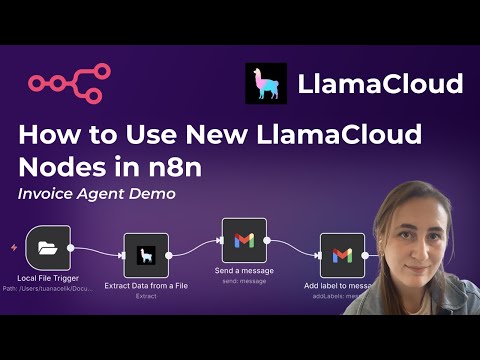
Llama Cloud Features & Functionality - Llama Cloud introduces open-source nodes for N8 workflows, integrating Llama Extract, Parse, and Cloud Indexes [1] - Llama Cloud offers three main products: Llama Parse, Llama Extract, and Llama Cloud Indexes [3] - Llama Extract uses large language models to extract information based on predefined schemas like invoice details (invoice number, amount, total amount, merchant) [4] - Llama Cloud nodes include Llama Parse for parsing PDF files and Llama Cloud for connecting to any given index name [10] Workflow Automation - N8 workflows can be triggered by changes in a specific folder, such as adding a new file to an invoices folder [2][6] - The extracted information can be used to automate tasks like sending emails with invoice details and labeling those emails in Gmail [3][8][9] - The Llama Cloud node can be used as a retriever and connected to other nodes such as an OpenAI message [11] Customization & Open Source - Users can create their own extraction agents or use pre-made schemas for research papers, filing reports, technical résumés, etc [4][5] - The N8 Llama Cloud integration is open source, allowing users to add extra functionality [11]
Introducing LlamaIndex FlowMaker, an open source GUI for building LlamaIndex Workflows
LlamaIndex· 2025-07-24 14:00
Core Functionality - LlamaIndex introduces FlowMaker, an experimental open-source visual agent builder enabling AI agent creation via drag-and-drop without coding [1] - FlowMaker automatically generates TypeScript code for visual flows [1] - The platform integrates with LlamaCloud indexes and tools [1] - It offers an interactive browser testing environment for real-time feedback [1] Key Features - FlowMaker features a visual drag-and-drop interface for no-code agent development [1] - It supports complex flow patterns with loops and conditional logic [1] Use Cases - FlowMaker facilitates basic agent creation by connecting user input nodes to language models [1] - It enables tool integration, demonstrated by a resume-searching agent using LlamaCloud indexes [1] - The platform allows implementing decision logic, conditional branching, and loop-back mechanisms for intelligent conversation routing [1] Feedback - LlamaIndex is actively seeking user feedback on FlowMaker [1]
Multimodal Report Generation with LlamaParse
LlamaIndex· 2025-07-24 00:14
Llama Index Report Generation Agent Overview - Llama Index introduces a report generation agent capable of creating reports with interspersed text and images from complex PDFs like research papers [1] - The agent leverages Llama Parse to extract text and images, including charts, from PDFs [2][3][4][5] - The workflow involves creating chat history, retrieving document chunks, and generating reports [6] - The agent can switch between document retrieval and chunk retrieval, facilitating comparisons across multiple research papers [16][17] Technical Implementation - Llama Parse is initialized with "PAS with agent mode" to extract high-resolution OCR, full-page screenshots, and extracted charts [8][9] - A structured LLM, using a Pydantic model called "report output," defines the structure of the report, allowing for text and image blocks [11][12] - The agent uses a system prompt and a structured LLM to generate the report [12][13] - The agent utilizes chunk retriever and document retriever tools [14] Application and Use Cases - The generated reports can analyze specific topics, such as MetaGPT experimental techniques, with relevant images embedded [7][15] - The technique is applicable to research papers, presentations, quarterly reports, and other documents with charts and figures [16]
How to Use New LlamaCloud Nodes in n8n - Invoice Agent
LlamaIndex· 2025-07-23 10:44
Hello everyone. This is Tuana from Llama Index and in this video I'm going to quickly walk you through how you can use Llama Cloud nodes in NAT workflows. These are open-source nodes that we've just created and it brings Llama Extract P and Llama Cloud indexes to NAN workflows.In this video, we're going to be looking at a very simple example. As you can see, I've already run this workflow. And what it does is once there is a change in a specific folder, specifically in my case the invoices folder on my mach ...
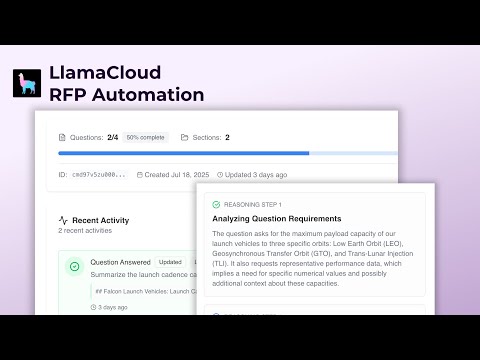
Automate RFP Responses in Minutes with LlamaIndex's Open-Source Solution
LlamaIndex· 2025-07-21 17:58
Automation Solution - Lana Index introduces an open-source application, Auto RFP, designed to automate the request for proposal (RFP) process [2] - The automation aims to reduce the time required to build an RFP from hours to minutes [1] - The application allows users to create multiple organizations and projects [2][3] - Users can integrate their own LlamaCloud API key and index to run their RFP process [11] Key Features - The application uses pre-written questions about documents to generate answers for RFPs [5] - It can generate answers in a simple, one-shot manner using OpenAI, citing sources and page numbers [6][7] - Reasoning mode offers a multi-step approach to answering questions, including analyzing requirements, searching documents, extracting key facts, creating an RFP structure, and validating the response [8][9] - The generated answers can be exported as a CSV file, providing a structured RFP with sections, questions, and detailed answers in markdown [10][11]