个人所得税综合所得汇算清缴

Search documents
明起可预约,事关你的个税
Zhong Guo Zheng Quan Bao· 2026-02-24 14:31
近期,国家税务总局发布关于2025年度个人所得税综合所得汇算清缴预约办理时间的通告。个人所得税 综合所得汇算清缴办理时间为2026年3月1日至6月30日。自2月25日起,可通过个人所得税App提前预约 办理。 可以通过哪些渠道办理年度汇算?如何预约办理?需要提前准备哪些信息?跟着中证君一起来看看吧! Q 什么是年度汇算? 个人所得税App显示,年度汇算指的是年度终了后,纳税人将全年取得的工资薪金、劳务报酬、稿酬、 特许权使用费等四项综合所得合并计算,得出应纳个人所得税,向税务机关申报并办理退税或补税的过 程。 A Q 可以通过哪些渠道办理年度汇算? 纳税人可通过个人所得税手机App、自然人电子税务局网站(https://etax.chinatax.gov.cn)或前往办税服 务厅自行办理,也可以通过任职受雇单位或委托其他机构或个人代为办理。税务机关不会授权其他所谓 的"电子"渠道,请纳税人注意甄别,且勿受"能够大量退税"的影响点击不明链接,以免自身信息泄露财 产遭受损失。 A Q 如何预约办理年度汇算? 2025年度个人所得税综合所得汇算清缴办理时间为2026年3月1日至6月30日。纳税人需在3月1日至3月2 ...

退钱了!退钱了!明起预约
Sou Hu Cai Jing· 2026-02-24 12:17
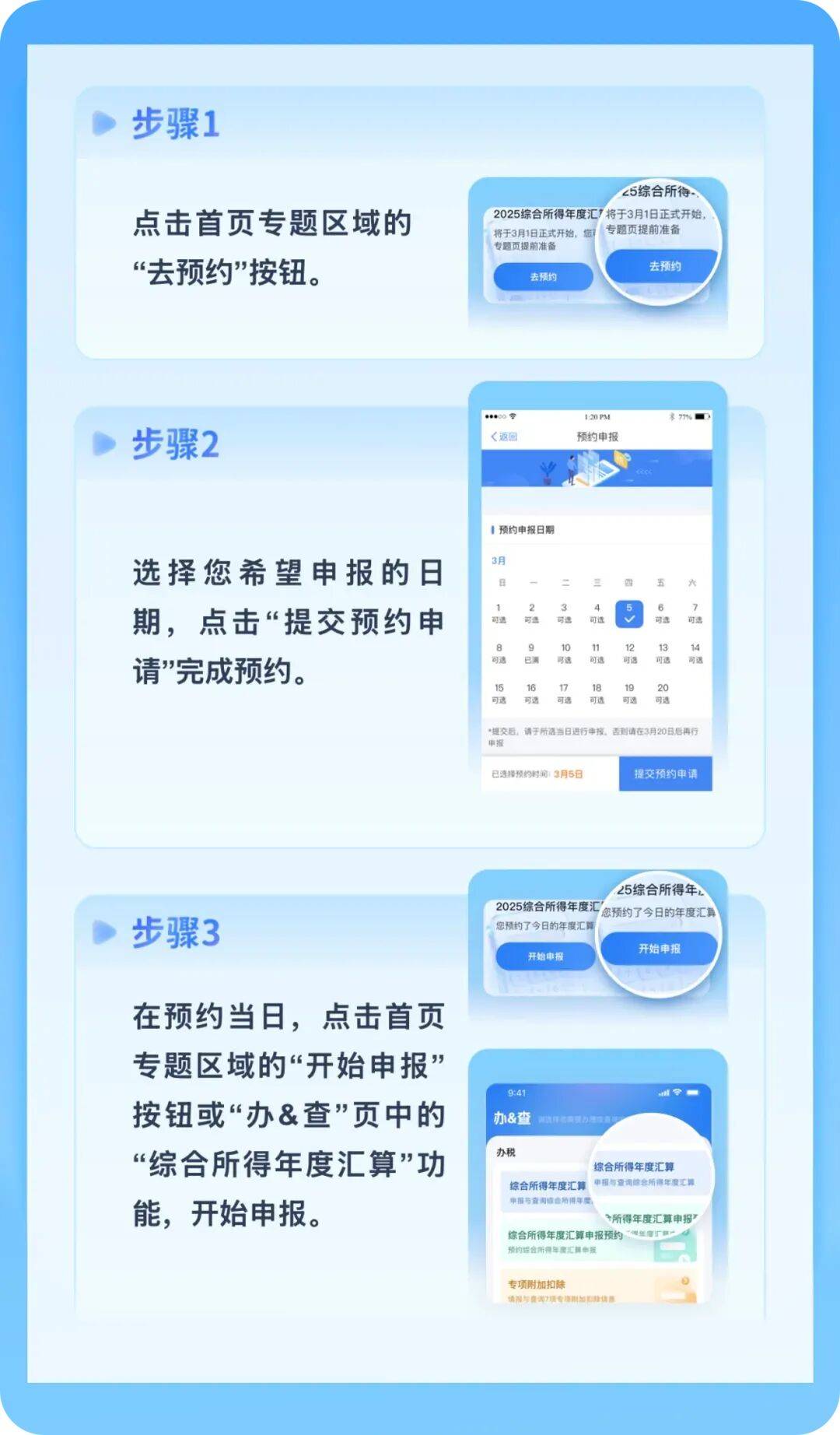
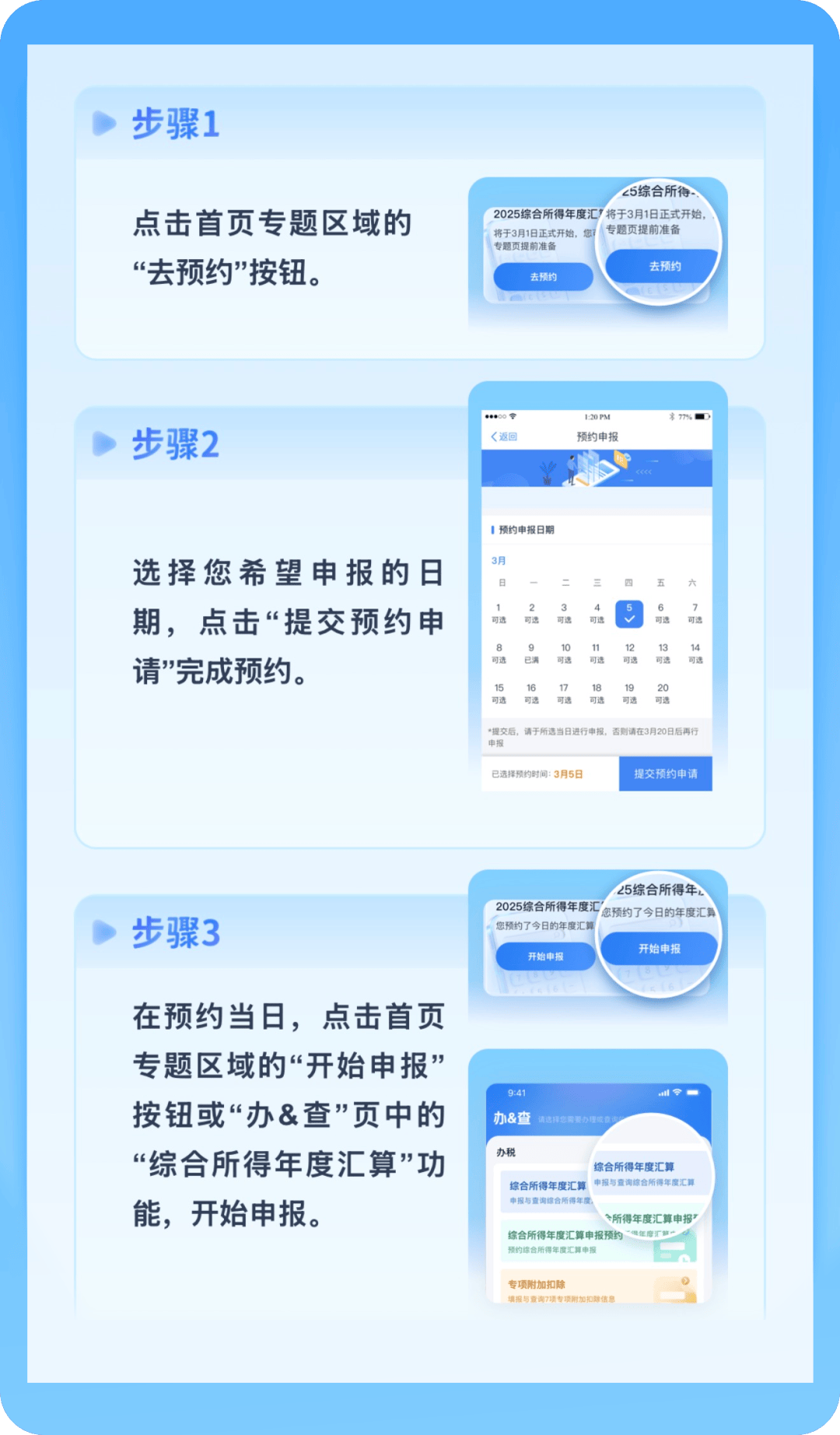
纳税人在纳税年度内已依法预缴个人所得税,且符合下列情形之一的,需办理年度汇算: 符合下列情形之一的,无需办理年度汇算: 据国家税务总局通告, 2025年度个人所得税综合所得汇算清缴办理时间为2026年3月1日至6月30日。 纳税人需在3月1日至3月20日期间办理的,可以自2月25日起通过"个人所得税"App提前预约;3月21日至6月30日期间,纳税人无需预约,可以随时办理。 预约步骤看这里↓↓ 哪些人需要办理? 专业人员帮你多退税 如何申报? 已预缴税额大于年度汇算应纳税额且申请退税的。 纳税年度内取得的综合所得收入超过12万元且需要补税金额超过400元的。 年度汇算需补税但综合所得收入全年不超过12万元的。 年度汇算需补税金额不超过400元的。 已预缴税额与年度汇算应纳税额一致的。 符合年度汇算退税条件但不申请退税的。 只要提供个税App账号密码和银行卡号,就可以帮忙操作办理个税汇算退税,按退税到账金额比例支付服务费,若没有成功不收取费用。 网警提醒:不要向陌生人提供自己的任何账号及密码。 诱导填报虚假个税信息 以"利用税收优惠政策""减轻个人负担"等为由,声称可以利用虚假资质、名义等方式提供相关个人退税" ...
退钱了!退钱了!明天开启,遇到这些情况要警惕↗
Xin Lang Cai Jing· 2026-02-24 11:12
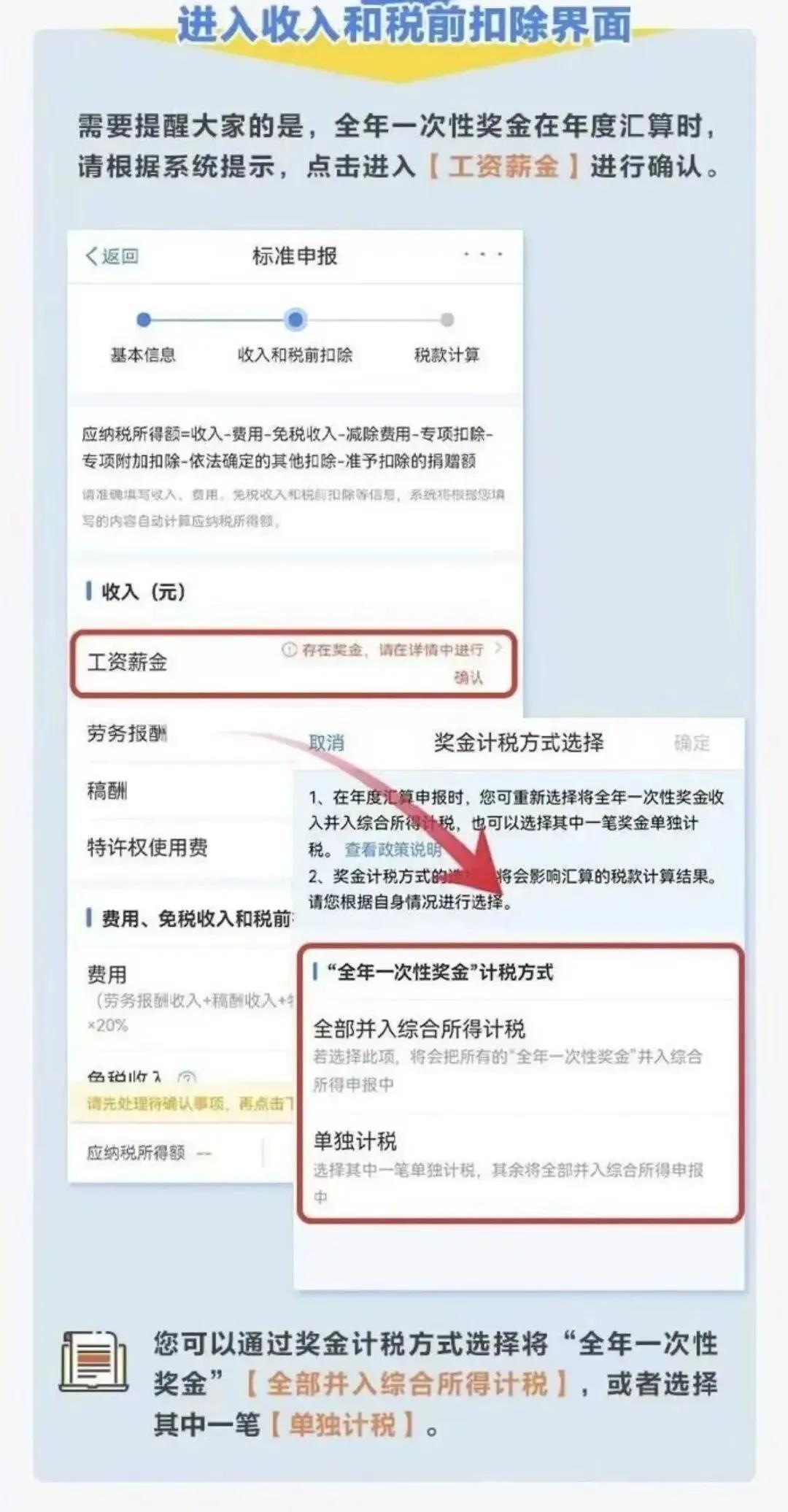
Core Viewpoint - The annual "more refund, less supplement" process for personal income tax will begin, with the State Taxation Administration announcing that taxpayers can make appointments for the 2025 annual comprehensive income tax settlement starting February 25, 2026 [1][14]. Group 1: Tax Settlement Process - The comprehensive income tax settlement for the 2025 tax year will take place from March 1 to June 30, 2026, with appointment services available for taxpayers [1][14]. - Taxpayers who need to settle between March 1 and March 20 can make appointments starting February 25 through the personal income tax app [1][14]. - From March 21 to June 30, taxpayers can settle without an appointment at any time [1][14]. Group 2: Tax Calculation Methods - There are two methods for tax calculation: separate taxation and combined taxation [3][16]. - Separate taxation allows taxpayers to calculate tax on their annual bonus without including it in their total income, using a monthly average to determine the applicable tax rate [3][16]. - Combined taxation includes the year-end bonus in the total income for tax calculation, which may result in a higher tax rate [3][16]. Group 3: Taxpayer Guidance - Taxpayers are advised to choose separate taxation if their salary income exceeds their year-end bonus, as it typically results in a lower tax rate [5][18]. - Taxpayers can choose both methods and select the one that results in a higher refund or lower payment [5][18]. Group 4: Fraud Warnings - The tax authority warns against scams involving false promises of tax refunds, urging taxpayers not to share personal information such as app passwords or bank details [6][19]. - Taxpayers should be cautious of individuals claiming to provide "artificial tax refunds" or contacting them about tax audits, as these are often fraudulent [10][12][19].
转发提醒!这笔钱可退,明起预约
Xin Lang Cai Jing· 2026-02-24 11:07
(来源:潮新闻) 据国家税务总局通告,2025年度个人所得税综合所得汇算清缴办理时间为2026年3月1日至6月30日。 纳税人需在3月1日至3月20日期间办理的,可以自2月25日起通过个人所得税App提前预约;3月21日至6月30日期间,纳税人无需预约,可以随时办理。 预约步骤看这里↓↓ 哪些人需要办理? 纳税人在纳税年度内已依法预缴个人所得税,且符合下列情形之一的,需办理年度汇算: 符合下列情形之一的,无需办理年度汇算: 如何申报? 可通过下载"个人所得税"App及登录自然人电子税务局网页端进行申报。 前往主管税务机关办税服务厅进行申报。 收到这些信息请勿轻信 在个税汇算这段时间,如果突然收到以下内容信息,请勿轻信! 专业人员帮你多退税 只要提供个税App账号密码和银行卡号,就可以帮忙操作办理个税汇算退税,按退税到账金额比例支付服务费,若没有成功不收取费用。 网警提醒:不要向陌生人提供自己的任何账号及密码。 诱导填报虚假个税信息 可由所在扣缴义务人集中进行申报。 纳税人可委托第三方中介机构或个人完成年度汇算。 按要求将必备材料邮寄给指定税务机关进行申报。 以"利用税收优惠政策""减轻个人负担"等为由,声称可 ...
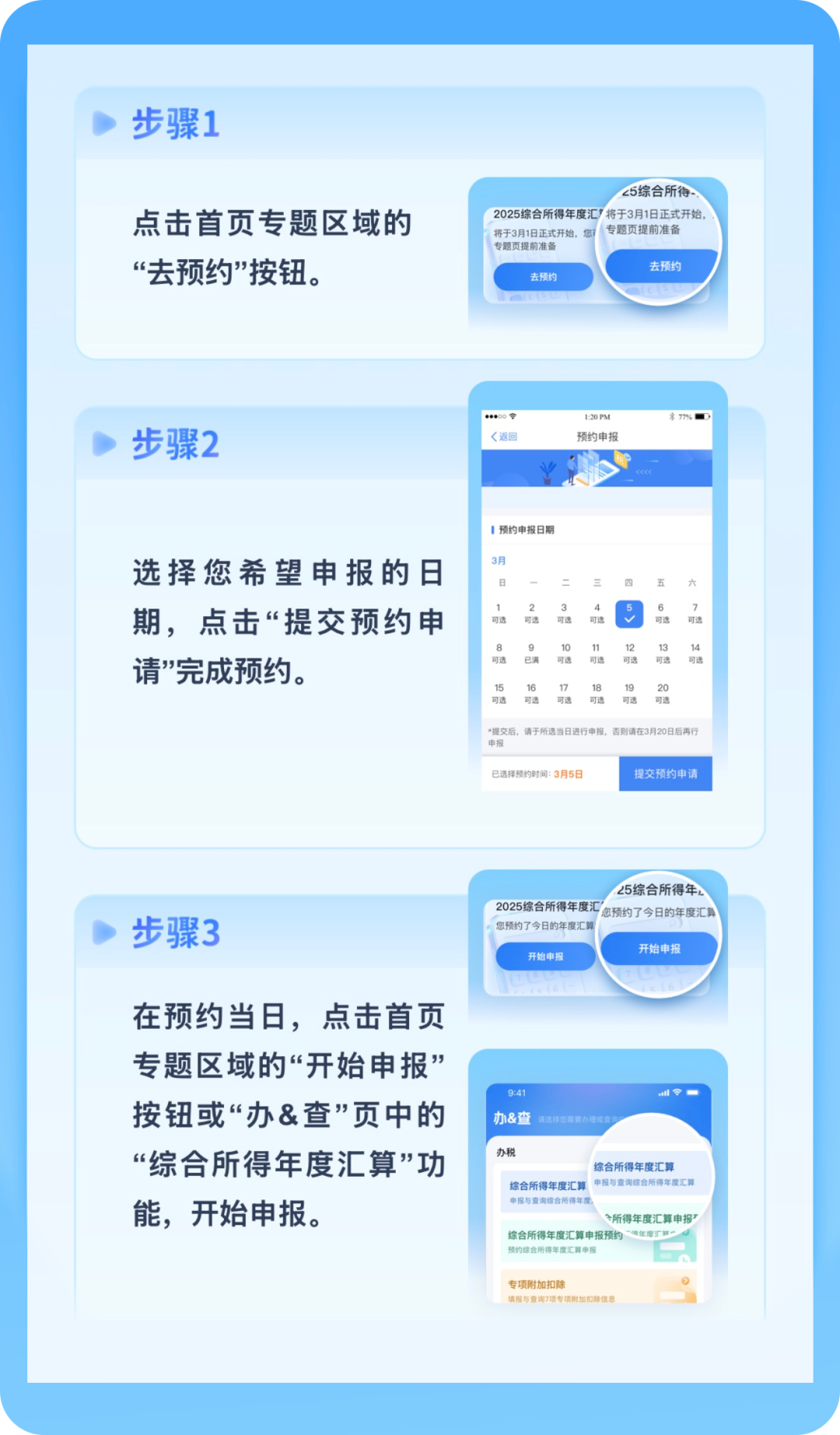
退钱了!退钱了!明天开启,遇到这些情况要警惕
Sou Hu Cai Jing· 2026-02-24 10:53
Core Viewpoint - The annual "more refund, less payment" process for personal income tax will begin, with the State Taxation Administration announcing the appointment service for the 2025 tax year from February 25, 2026 [1][6]. Group 1: Tax Filing Process - The comprehensive income tax filing period for the 2025 tax year is set from March 1 to June 30, 2026, with appointment services available for taxpayers [1][6]. - Taxpayers can make appointments through the personal income tax app starting February 25 for filings between March 1 and March 20, while those filing from March 21 to June 30 can do so without an appointment [1][6]. Group 2: Tax Calculation Methods - There are two methods for calculating taxes: separate taxation and combined taxation. Separate taxation allows for year-end bonuses to be calculated independently, potentially resulting in lower tax rates [5][2]. - Taxpayers can choose between the two methods to determine which results in a higher refund or lower payment [5]. Group 3: Tax Compliance and Fraud Warnings - The tax authority emphasizes the importance of accurate and truthful tax filings, warning that false reporting or document tampering will lead to serious consequences, including being placed on a tax oversight list [6]. - There are warnings against scams that promise to increase tax refunds by providing personal information, urging taxpayers to remain vigilant and not to share sensitive information [7][9][12].
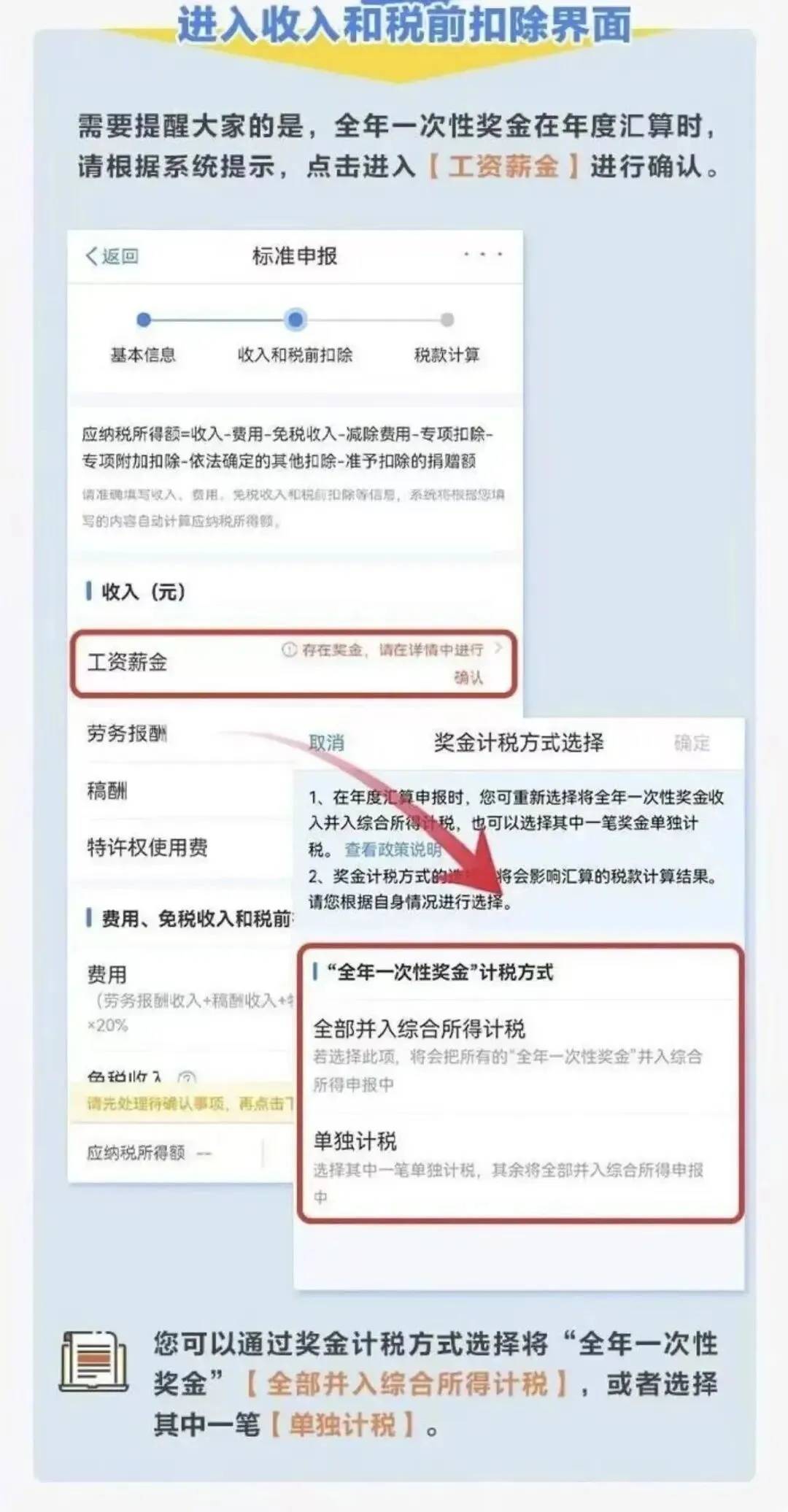
个税年度汇算,明天预约可尽早退税
Sou Hu Cai Jing· 2026-02-24 10:53
据国家税务总局通告,2025年度个人所得税综合所得汇算清缴办理时间为2026年3月1日至6月30日。 纳税人需在3月1日至3月20日期间办理的,可以自2月25日起通过个人所得税App提前预约;3月21日至6月30日期间,纳税人无需预约,可以随时办理。 预约步骤看这里↓↓ 哪些人需要办理? 纳税人在纳税年度内已依法预缴个人所得税,且符合下列情形之一的,需办理年度汇算: 已预缴税额大于年度汇算应纳税额且申请退税的。 纳税年度内取得的综合所得收入超过12万元且需要补税金额超过400元的。 符合下列情形之一的,无需办理年度汇算: 年度汇算需补税但综合所得收入全年不超过12万元的。 年度汇算需补税金额不超过400元的。 已预缴税额与年度汇算应纳税额一致的。 符合年度汇算退税条件但不申请退税的。 如何申报? 可通过下载"个人所得税"App及登录自然人电子税务局网页端进行申报。 可由所在扣缴义务人集中进行申报。 纳税人可委托第三方中介机构或个人完成年度汇算。 按要求将必备材料邮寄给指定税务机关进行申报。 前往主管税务机关办税服务厅进行申报。 收到这些信息请勿轻信 在个税汇算这段时间,如果突然收到以下内容信息,请勿轻信! 以 ...
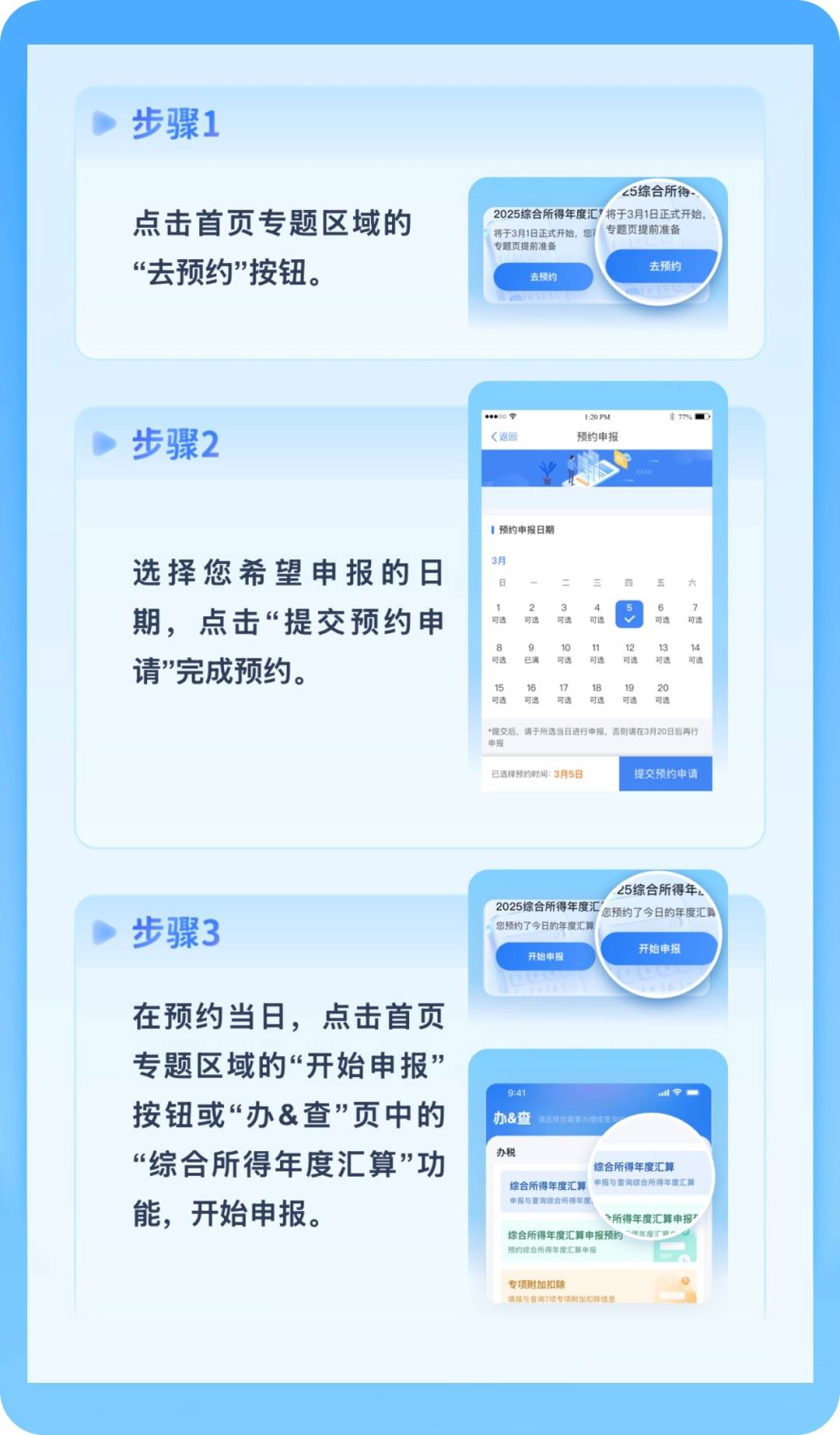
明日起预约!申请退税别错过→
Xin Lang Cai Jing· 2026-02-24 09:05
转自:长沙发布 国家税务总局发布通告,明确2025年度个人所得税综合所得汇算清缴办理时间为2026年3月1日至6月30日,税务部门将为纳税人提供预约办理服务。 来源丨央视新闻 记者丨李厦 编辑丨陈叶灵 校对丨彭烨 审核丨杜进 纳税人需在3月1日至3月20日期间办理的,可以自2月25日起通过个人所得税App提前预约; 3月21日至6月30日期间,纳税人无需预约,可以随时办理。 ■符合下列情形之一的,纳税人需办理年度汇算: 已预缴税额大于年度汇算应纳税额且申请退税的; 纳税年度内取得的综合所得收入超过12万元且需要补税金额超过400元的。 ■纳税人在纳税年度内已依法预缴个人所得税,且符合下列情形之一的,无需办理年度汇算: 年度汇算需补税但综合所得收入全年不超过12万元的; 年度汇算需补税金额不超过400元的; 已预缴税额与年度汇算应纳税额一致的; 符合年度汇算退税条件但不申请退税的。 ...

一年一度多退少补要开始了!明起预约
Sou Hu Cai Jing· 2026-02-24 07:05
据国家税务总局通告,2025年度个人所得税综合所得汇算清缴办理时间为2026年3月1日至6月30日。 纳税人需在3月1日至3月20日期间办理的,可以自2月25日起通过个人所得税App提前预约;3月21日至6月30日期间,纳税人无需预约,可以随时办理。 预约步骤看这里↓ 哪些人需要办理? 纳税人在纳税年度内已依法预缴个人所得税,且符合下列情形之一的,需办理年度汇算: 已预缴税额大于年度汇算应纳税额且申请退税的。 纳税年度内取得的综合所得收入超过12万元且需要补税金额超过400元的。 符合下列情形之一的,无需办理年度汇算: 年度汇算需补税但综合所得收入全年不超过12万元的。 年度汇算需补税金额不超过400元的。 已预缴税额与年度汇算应纳税额一致的。 可通过下载"个人所得税"App及登录自然人电子税务局网页端进行申报。 可由所在扣缴义务人集中进行申报。 纳税人可委托第三方中介机构或个人完成年度汇算。 按要求将必备材料邮寄给指定税务机关进行申报。 前往主管税务机关办税服务厅进行申报。 在个税汇算这段时间,如果突然收到以下内容信息,请勿轻信! 专业人员帮你多退税 符合年度汇算退税条件但不申请退税的。 如何申报? 假的! ...
个人所得税综合所得汇算清缴明天起可预约
Sou Hu Cai Jing· 2026-02-24 05:34
据国家税务总局通告,2025年度个人所得税综合所得汇算清缴办理时间为2026年3月1日至6月30日。 纳税人需在3月1日至3月20日期间办理的,可以自2月25日起通过个人所得税APP提前预约;3月21日至6月30日期间,纳税人不需要预约,可以随时办理。 哪些人需要办理? 纳税人在纳税年度内已依法预缴个人所得税,且符合下列情形之一的,需办理年度汇算: 符合下列情形之一的,无需办理年度汇算: 专业人员帮你多退税:只要提供个税APP账号密码和银行卡号,就可以帮忙操作办理个税汇算退税,按退税到账金额比例支付服务费,若没有成功不收取 费用。假的! 网警提醒:不要向陌生人提供自己的任何账号及密码。 诱导填报虚假个税信息:以"利用税收优惠政策""减轻个人负担"等为由,声称可以利用虚假资质、名义等方式为提供相关个人退税"服务",增加退税金额 等。 假的! 网警提醒:诱导填报虚假个税信息骗局具有欺诈性,会给个人财产和社会安全带来了不可忽视的风险,大家一定要提高警惕,请勿上当。 税务稽查人员联系你:"税务稽查部门人员"通过拨打电话或发送短信告知你被列入本次税务稽查的名单。接下来会通过聊天软件,发送假通知、假资料等 方式,骗取信任 ...
明起可预约退税!具体攻略快收藏
Sou Hu Cai Jing· 2026-02-24 05:01
据国家税务总局通告,2025年度个人所得税综合所得汇算清缴办理时间为2026年3月1日至6月30日。 纳税人需在3月1日至3月20日期间办理的,可以自2月25日起通过个人所得税App提前预约;3月21日至6月30日期间,纳税人无需预约,可以随时办理。 预约步骤看这里 符合下列情形之一的,无需办理年度汇算: 如何申报? 收到这些信息请勿轻信 哪些人需要办理? 纳税人在纳税年度内已依法预缴个人所得税,且符合下列情形之一的,需办理年度汇算: 在个税汇算这段时间,如果突然收到以下内容信息,请勿轻信! ❌专业人员帮你多退税 只要提供个税App账号密码和银行卡号,就可以帮忙操作办理个税汇算退税,按退税到账金额比例支付服务费,若没有成功不收取费用。 假的! 网警提醒:不要向陌生人提供自己的任何账号及密码。 ❌诱导填报虚假个税信息 以"利用税收优惠政策""减轻个人负担"等为由,声称可以利用虚假资质、名义等方式为提供相关个人退税"服务",增加退税金额等。 假的! 网警提醒:诱导填报虚假个税信息骗局具有欺诈性,会给个人财产和社会安全带来了不可忽视的风险,大家一定要提高警惕,请勿上当。 ❌税务稽查人员联系你 "税务稽查部门人员"通 ...