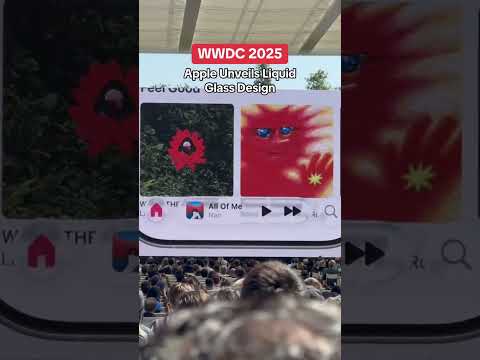
Liquid Glass

Search documents
Liquid Glass Showcase: Tide Guide | Meet with Apple
Apple Developer· 2025-12-19 23:00
Good morning everyone. My name is Tucker MacDonald and I'm the founder of Condor Digital, an app design and development studio. I'm thrilled to be here today to talk about my app, Tide Guide.I certainly realize that Tide Guide doesn't have the same household name recognition as some of my previous presenters. So let me tell you a little bit about the app. Tide Guide is my ocean tides and marine weather app that I've been publishing since 2018.The app has grown from my experiences growing up by the ocean, fi ...

Liquid Glass Showcase: CNN | Meet with Apple
Apple Developer· 2025-12-19 20:00
Hi everyone, I'm Kevin Long, director of Apps at CNN. I've been with CNN for four years, leading our efforts to deliver world class News experiences on iOS and Android. Mobile is at the forefront of CNN's digital strategy.It's where our most engaged users are, whether they're watching live videos, reading breaking news, or getting alerts in real time. Our goal is to deliver fast, seamless and native experiences that feel right at home on Apple devices. Our motivation to adopt Apple technologies early stems ...

X @TechCrunch
TechCrunch· 2025-12-12 20:46
With iOS 26.2, Apple lets you roll back Liquid Glass again — this time on the Lock Screen https://t.co/SL11mBYDl5 ...
watchOS 26 首个公测版来了,这些新功能值得尝鲜体验
3 6 Ke· 2025-07-30 08:43
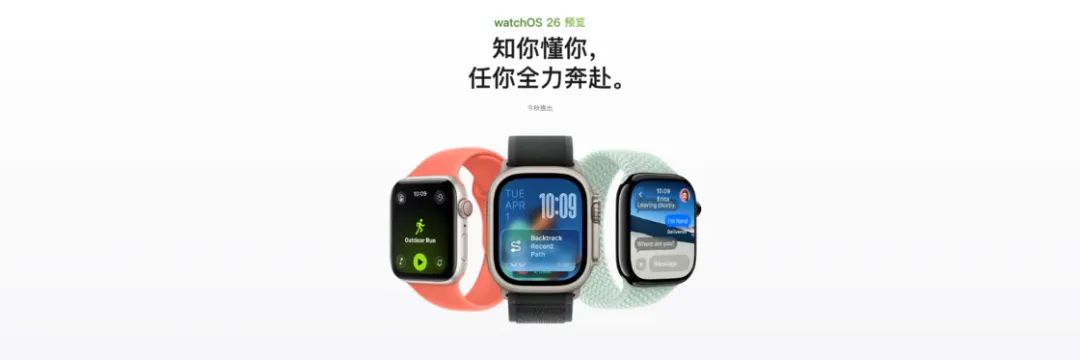
Core Points - Apple has released the first public beta of watchOS 26, introducing several new features and design improvements [1] - The update includes a new Liquid Glass design, enhanced gesture controls, and a more comprehensive control center [4][10][13] Design and User Interface - watchOS 26 features a limited implementation of Liquid Glass design, primarily in specific interfaces such as photo watch faces and control center icons [4][7] - The Liquid Glass effect is not universally applied to all watch faces, with certain designs more likely to display this style [6][9] - The update maintains many design elements from previous versions, resulting in a less striking appearance compared to other operating systems [9] New Features - A new "wrist flip" gesture allows users to mute calls and notifications or return to the clock or app list, enhancing usability [10][12] - The control center has been upgraded to allow for more customization, enabling users to add new buttons for various functions and third-party apps [13] - The fitness app has received a UI update, and a new feature called "Workout Buddy" provides personalized encouragement during workouts [15][17] Functionality Enhancements - watchOS 26 introduces automatic volume adjustment for notifications based on ambient noise levels, available only on specific Apple Watch models [22] - The update includes improved smart stack suggestions that provide context-aware actions based on user habits [23] - A new notes app has been added to the Apple Watch, allowing for quick voice memos [25][27] Architecture Upgrade - The architecture of Apple Watch has been upgraded from arm64_32 to standard arm64, improving performance and compatibility for future applications [28][31] - This change allows for more complex calculations and better energy efficiency, while still supporting older applications through a compatibility layer [31][33] Additional Features - watchOS 26 supports real-time captions for messages and includes features like unknown call filtering and context-aware message responses [35][38][40] - The update also brings various minor enhancements, such as button animations and improved watch face selection [42][43] Conclusion - Overall, watchOS 26 offers a range of new features and improvements, although many functionalities still require integration with Apple services, which may not be fully accessible to all users [45]
X @TechCrunch
TechCrunch· 2025-07-07 19:16
Product Update - iOS 26 beta 3 dials back Liquid Glass feature [1] Industry News - TechCrunch reports on iOS 26 beta 3 update [1]
iPhone,iOS 26,彻底变样新体验!
猿大侠· 2025-07-06 03:13
Core Viewpoint - Apple has introduced a new generation of operating systems at WWDC 25, focusing on a unified naming convention and the largest interface redesign in history, featuring the new "Liquid Glass" design language [1][5][27]. Group 1: Unified Naming Convention - All six operating systems have been renamed to version "26": iOS 26, watchOS 26, tvOS 26, macOS 26, visionOS 26, and iPadOS 26, indicating that this version will be used until 2026 [2][3]. Group 2: Liquid Glass Design Language - The "Liquid Glass" design language introduces optical properties similar to glass, allowing for a semi-transparent effect that adapts to the environment's light conditions [5][29]. - The design blurs the lines between hardware and software, setting a new aesthetic standard for future products and user interactions [5]. Group 3: Interface Changes in iOS 26 - The main interface features a layered glass effect for app icons, creating a sense of depth and transparency [7][9]. - The Dock and search buttons have a transparent design, integrating seamlessly with the background, while app folders use a frosted glass effect that changes color based on the wallpaper [9][10]. - Users can edit wallpapers directly from the home screen, allowing for customization of colors and effects [18]. Group 4: Additional Features - The Control Center has been redesigned with a depth effect and light variations, enhancing the visual experience compared to iOS 18 [20]. - Web applications can now be added to the home screen and will open as dedicated web apps, improving accessibility [24]. - Two unannounced features are expected to be released later this year: real-time translation via AirPods and cross-device Wi-Fi credential synchronization [31][32].
Say hello to Liquid Glass
Apple Developer· 2025-06-10 17:26
Product Design - Introduces Liquid Glass, a new design combining glass optics with fluidity [1] - Features a new design, further details available via provided YouTube link [1] Event Information - Announcement made at WWDC25 [1]
iPhone 新系统体验:「液态玻璃」好看但不好用,劝你先别升级
3 6 Ke· 2025-06-10 02:13
Core Points - The announcement of iOS 26 and iPadOS 26 at WWDC 2025 represents the most significant update since iOS 7, introducing a new cross-system UI design language called "Liquid Glass" that simulates a realistic glass texture on screens [1][5][16] - The "Liquid" aspect of the design emphasizes rich animations and dynamic effects, marking a departure from the flat design style that has been in place since iOS 7 [3][5] - iOS 26 features a new transparent icon style and variable fonts for the lock screen, enhancing the visual depth and interactivity of the interface [7][9] - The camera app has undergone a significant UI change, moving away from the flat design to a more nostalgic single-lens style, which may reflect a shift in design philosophy [11][13] - iPadOS 26 introduces a desktop-like multi-window functionality and improved file management, enhancing productivity and efficiency for users [16][18][20] - The update also includes a preview feature for documents, allowing users to view files directly in the file manager without needing to open them in compatible apps [20] - Despite the promising features, the developer beta version has been noted for having a high number of bugs, affecting user experience [22][23] Summary by Sections iOS 26 Features - The new "Liquid Glass" design language offers a realistic glass-like appearance, contrasting with the previous flat design [1][5] - Enhanced animations and effects are a key focus, providing a more dynamic user experience [3][5] - The introduction of a transparent icon style and variable fonts for the lock screen adds depth to the interface [7][9] Camera and Photo Management - The camera app's icon has reverted to a single-lens design, indicating a potential shift back to more tactile, nostalgic aesthetics [11][13] - The photo album has been simplified for easier navigation, and a new AI-driven "Spatial Scene" feature enhances photo depth perception [15] iPadOS 26 Enhancements - iPadOS 26 introduces a comprehensive multi-window feature, closely resembling desktop operating systems, improving multitasking capabilities [16][18] - File management has been upgraded with functionalities borrowed from macOS, including customizable folder icons [18][20] - The addition of a preview feature allows for quick document viewing directly within the file manager [20] Overall Assessment - The updates signify a major shift in both design and functionality for Apple's software platforms, aiming to enhance user experience and productivity [22][23]

iOS 26 Features: Apple’s Liquid Glass, Visual Intelligence and More | WSJ
The Wall Street Journal· 2025-06-10 00:47
New iOS Features - Apple announces iOS 26, a major redesign with a sleek, glass-like interface across lock screen, home screen, and redesigned apps like Camera and Safari, aiming for a bigger screen feel [1][2][3] - The new OS includes call screening for unknown numbers, hold assist, and live translation, features already present in Google and Samsung devices [5][6] - Messages are enhanced with typing indicators for group chats, polls, and customizable backgrounds [6] - Apple integrates AI, including visual intelligence for screenshots with search and ChatGPT integration, and opens on-device large language models to developers [7] - iOS 26 includes smaller updates like customizable alarm snooze times, camera lens cleaning alerts, and a redesigned CarPlay with widgets [8] User Experience and Design - The "liquid glass" design aims for a translucent, real-world glass-like feel, customizing app icons and redesigning popular apps [2] - Web pages in Safari will flow edge-to-edge, dynamically shrinking the tab bar to maximize content visibility [3] - Camera app receives a more intuitive design, simplifying photo and video capture modes [3] - The new design language will extend to macOS, iPadOS, CarPlay, and more [3] - Redesigns can initially face user resistance, as seen with iOS 7, but users typically adapt over time [4] Availability - iOS 26 will be available to the public this fall, with a public beta in July, supporting iPhones as far back as the iPhone 11 [9]
Liquid Glass: A Sassy New Look for iPhone
CNET· 2025-06-09 17:56
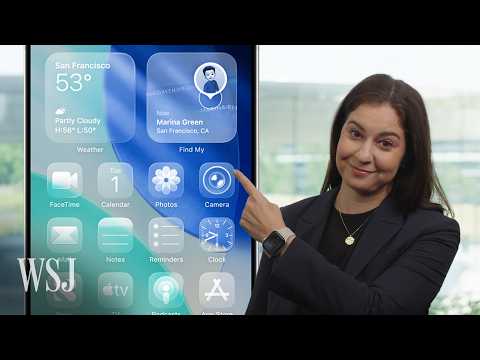
User Interface Design & Functionality - Liquid glass material adapts intelligently between light and dark environments, enhancing user experience [1] - Alerts appear from the point of user tap, streamlining interactions [2] - Context menus expand into easily scannable lists for improved navigation [2] - Tap bars shrink when scrolling to elevate content, instantly reappearing when scrolling up, creating a more intuitive experience [3] Visual Aesthetics & Customization - App icons are crafted with multiple layers of liquid glass, offering diverse visual options [3] - Icons come to life in light mode, dark mode, colorful new tints, or a clear look, providing customization [3]