Pake

Search documents
Skills的最正确用法,是将整个Github压缩成你自己的超级技能库。
数字生命卡兹克· 2026-01-21 02:18
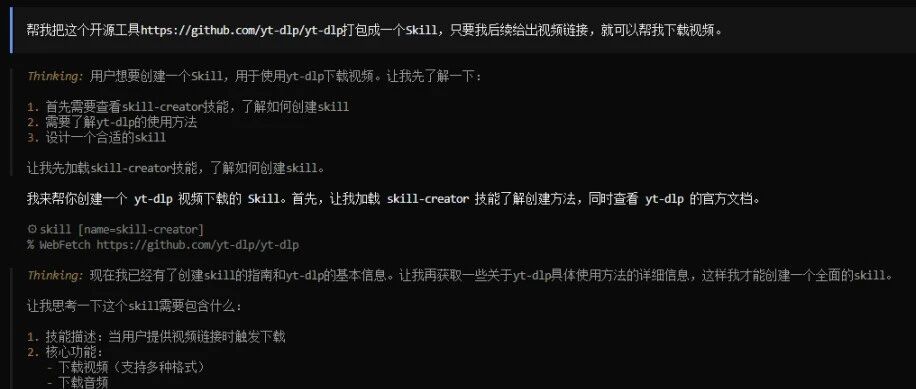
Core Viewpoint - The article emphasizes the importance of utilizing existing open-source projects to create Skills, thereby avoiding redundant development and enhancing efficiency in various applications [2][3]. Group 1: Skills and Open-Source Integration - Skills can package scripts and prompts together, allowing for easier access to powerful open-source tools [3]. - The integration of open-source projects into Skills can significantly improve their success rate, stability, and efficiency compared to code generated on-the-fly by AI [3][4]. - The author has successfully created multiple Skills by wrapping open-source projects, demonstrating the practical application of this approach [8][12]. Group 2: Practical Applications and Examples - A notable example is the creation of a Skill for downloading videos from various platforms using the open-source project yt-dlp, which has garnered 143k stars on GitHub [10][11]. - The process involves using AI to search for relevant GitHub projects, packaging them into Skills, and iterating on them for improved performance [32]. - The article outlines a step-by-step method for creating a video downloader Skill, highlighting the efficiency of the process after initial setup [26][30]. Group 3: Broader Implications of Skills - The article suggests that the Skills framework allows ordinary users to leverage the vast knowledge and experience embedded in open-source projects, effectively transforming them into powerful tools [43]. - It posits that the current era provides unprecedented opportunities for individuals to access and utilize collective human knowledge, making advanced capabilities available to everyone [44]. - The author encourages readers to embrace this technological advancement, suggesting that it can significantly enhance their productivity and capabilities [45].

一条命令,几秒就能把网站打包成桌面应用,轻巧还秒开~
菜鸟教程· 2025-09-12 03:30
Core Viewpoint - The article introduces Pake, an open-source tool that allows users to convert any webpage into a lightweight desktop application, significantly improving accessibility and user experience compared to traditional methods like Electron [3][6]. Group 1: Pake Overview - Pake is designed to create lightweight desktop applications from webpages, with a package size of approximately 5MB, making it nearly 20 times smaller than Electron [3][6]. - The tool utilizes Rust and Tauri architecture, resulting in superior performance and lower memory usage compared to traditional JavaScript frameworks [6]. - Pake supports various features such as keyboard shortcuts, immersive windows, drag-and-drop functionality, custom styles, and ad removal, enhancing the user experience beyond just packaging a webpage [6]. Group 2: Installation and Usage - To install Pake, users need to execute the command `pnpm install -g pake-cli`, after which they can use the `pake` command to package a webpage [8]. - Users can customize their applications by specifying parameters such as application name, icon, window dimensions, and more during the packaging process [8][17]. - The article provides examples of how to package specific webpages, demonstrating the ease of use and flexibility of the tool [8][17]. Group 3: Additional Resources - Pake has a GitHub repository with over 42,000 stars, indicating its popularity and community support [4]. - The article mentions the availability of pre-compiled packages for Rust, which can be downloaded if installation is slow [14]. - It also highlights the potential for integrating Pake with AI IDEs like Qoder, which can streamline the development of desktop applications [25][26].