浏览器指纹

Search documents
指纹浏览器 vs 无痕模式:选择哪个更适合跨境电商多账号管理?
Sou Hu Cai Jing· 2026-02-10 09:38
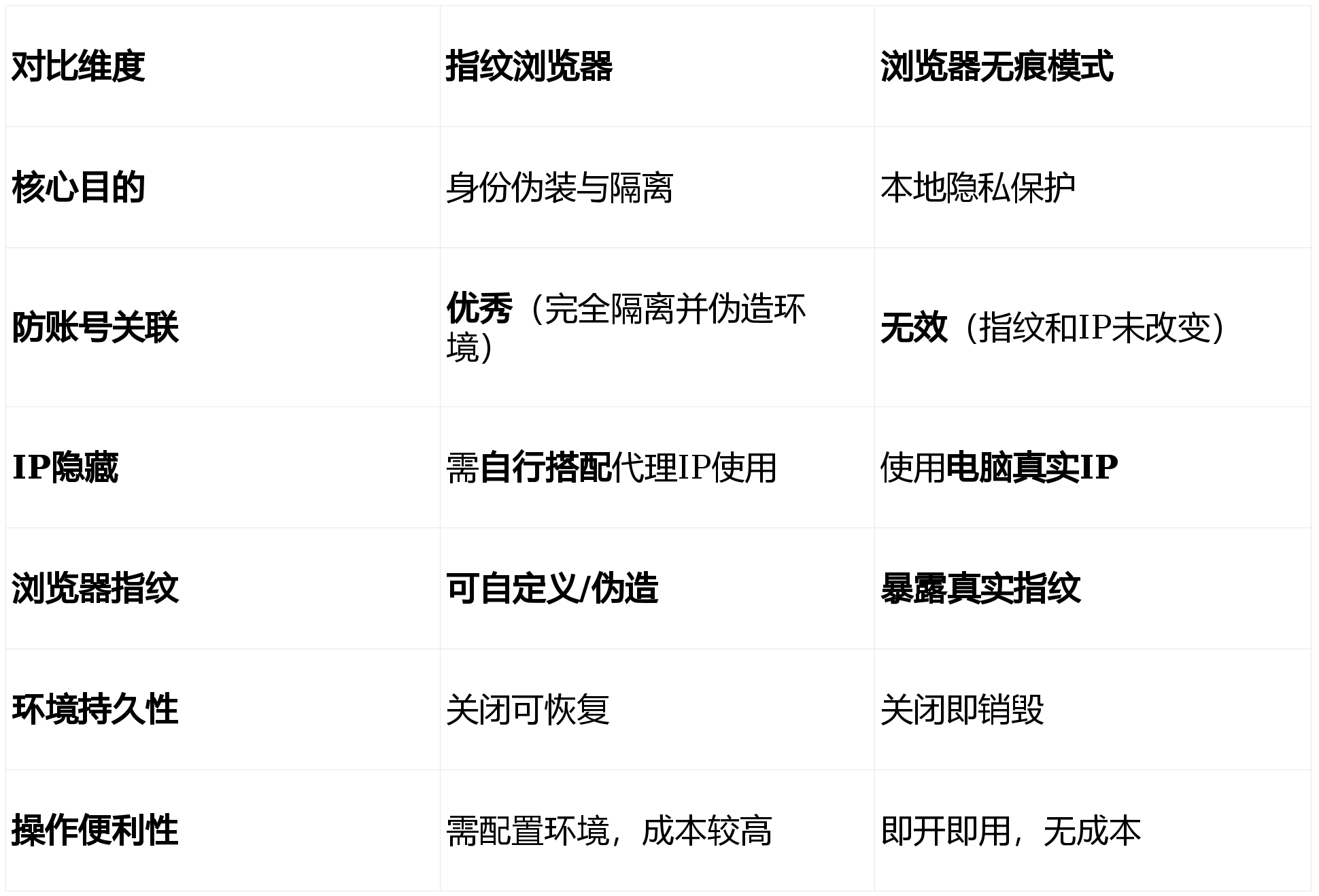
Core Insights - The article discusses the challenges of managing multiple accounts in cross-border e-commerce, emphasizing the importance of account security and the differences between fingerprint browsers and incognito mode [1][3]. Fingerprint Browser - The fingerprint browser actively forges and isolates browser fingerprints, creating a unique and stable virtual browser environment for each account [1]. - It can customize and spoof browser fingerprints, ensuring that each account operates in a completely isolated environment, which is crucial for preventing account bans [3][4]. - Fingerprint browsers are particularly effective for cross-border e-commerce operations, as they simulate multiple independent computers, thus reducing the risk of account association and bans [3][5]. Incognito Mode - Incognito mode focuses on privacy protection rather than identity masking, providing a temporary browsing session that does not leave local traces [2]. - It does not hide or alter the user's real information, meaning the actual IP address and browser fingerprint are still exposed to websites and service providers [3]. Comparison of Use Cases - Fingerprint browsers are suitable for scenarios requiring identity masking and account isolation, such as managing multiple accounts on e-commerce platforms and social media [3][4]. - Incognito mode is appropriate for temporary logins and testing website visitor states, as it clears local data but does not prevent account association [3][4]. Proxy IP Integration - Combining fingerprint browsers with proxy IPs enhances account security by ensuring that each virtual browser environment is linked to a unique IP address, preventing detection of account associations [5][9]. - Different types of proxy IPs (static, dynamic, residential) are suited for various business scenarios, with static residential IPs being advantageous for cross-border e-commerce [4][5]. Security Considerations - While using fingerprint browsers and proxy IPs significantly reduces the risk of detection, complete security is not guaranteed, as operational behaviors also play a critical role in account safety [8][9]. - Each virtual browser environment should ideally be paired with a distinct proxy IP to maintain account isolation [7].

隐藏在浏览器里的“指纹”,正成为新的隐私危机
3 6 Ke· 2025-08-05 11:27
Core Viewpoint - Apple is set to enhance its browser privacy protection measures by enabling "Advanced Fingerprint Protection" by default in its upcoming system update, which raises questions about the implications of this technology for user privacy [1][3]. Group 1: Browser Fingerprinting and Privacy - The term "fingerprint" in this context does not refer to biological fingerprints but rather to a complex method used by websites to track user behavior and identify users based on various device and browser configurations [3][11]. - Traditional tracking methods like cookies have been widely criticized for privacy risks, leading to the development of more sophisticated techniques such as browser fingerprinting, which combines multiple non-sensitive data points to create a unique user profile [8][11]. - Browser fingerprinting collects information such as operating system version, screen resolution, browser version, timezone, IP address, and hardware specifications, making it difficult to prevent tracking [11][13]. Group 2: Advanced Fingerprint Protection - Apple's "Advanced Fingerprint Protection" aims to reduce the uniqueness of browser fingerprints by providing websites with fabricated browser and device information, thereby enhancing user privacy without compromising browsing functionality [15][17]. - The effectiveness of this feature increases as more users enable it, potentially leading to a broader industry shift towards improved privacy measures [15][17]. - Despite the introduction of this feature, there are concerns that developers and advertisers may create new methods to circumvent these protections, highlighting the ongoing challenge of user privacy in the digital landscape [17].