有道云笔记

Search documents
AI,正在“杀死”哪些软件?
虎嗅APP· 2026-03-27 00:16
Group 1 - The core viewpoint of the article is that AI is significantly accelerating its impact on the software industry, leading to a potential reshaping of traditional software roles and functionalities [5][6]. - AI tools are increasingly replacing standard software functions, with companies like OpenAI and Anthropic enhancing their capabilities in various professional fields, indicating a shift towards AI as a primary execution tool [6][7]. - The development costs and timelines for software are being compressed due to AI programming tools, which can reduce development time from weeks to days, thus decreasing the scarcity of software itself [6][11]. Group 2 - The first category of software most affected by AI includes those that provide "general functions," which are often standardized and can be easily integrated into AI tools, making them vulnerable to replacement [14][15]. - The second category consists of software with "interactive attributes," which may be harder to replace, but those that can be described in simple language are at risk [17][18]. - Examples of software at high risk of being replaced include coding tools like Sublime Text and office applications like ProcessOn and Youdao Cloud Note, as AI programming assistants gain popularity [18][19]. Group 3 - Software companies are exploring three main transformation paths in response to AI's impact: shifting from tool provision to delivering results, embedding within AI ecosystems, and redesigning their business models around AI [24][25][26]. - The first path involves integrating AI capabilities into business processes to provide customized solutions rather than just tools [25]. - The second path focuses on becoming specialized service providers for AI models, potentially being called upon frequently by larger AI platforms [26]. - The third path is a more comprehensive transformation, embedding AI throughout the company's operations, which poses higher demands on technical capabilities and industry understanding [29].


未知机构:有道云笔记AI的催化都演绎了节后该怎么布局0223kk-20260224
未知机构· 2026-02-24 03:55
Summary of Conference Call Notes Company/Industry Involved - The notes pertain to the AI industry and its developments post-holiday season [1] Core Points and Arguments - The AI sector has experienced significant catalysis, indicating a transformative phase in technology and applications [1] - There is a focus on strategic positioning and investment opportunities as the market evolves after the holiday period [1] Other Important but Potentially Overlooked Content - The notes suggest a need for companies to reassess their strategies in light of recent AI advancements and market dynamics [1]
49.7k Star!免费开源 Markdown 笔记神器,不花钱是真滴香~
菜鸟教程· 2025-06-19 02:56
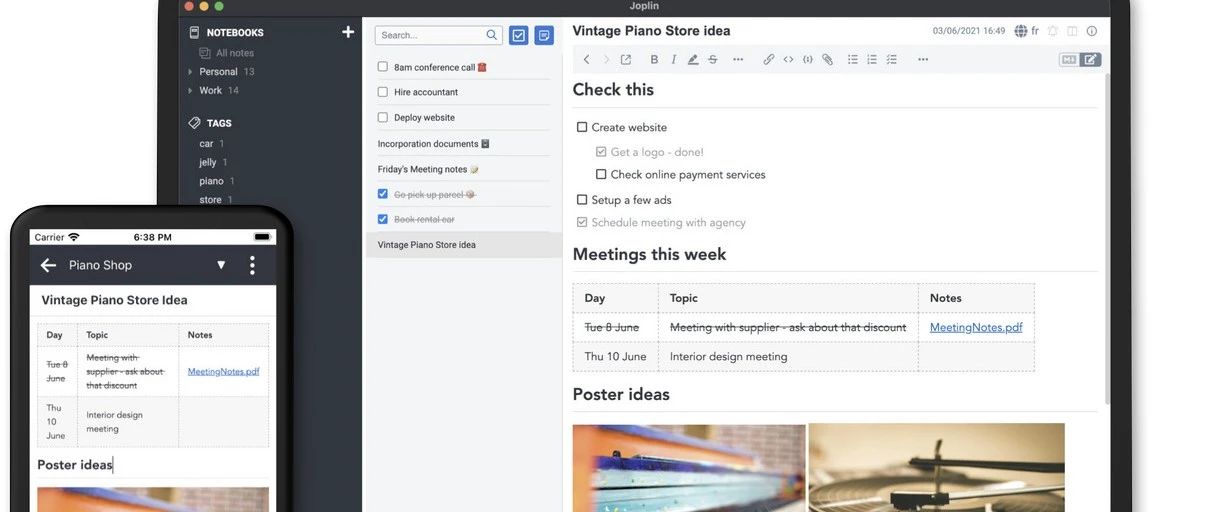
Core Viewpoint - Joplin is a free, open-source, cross-platform note-taking application that supports various operating systems and offers a wide range of features for users to manage their notes effectively [2][3]. Features Overview - Joplin supports multiple platforms including Windows, macOS, Linux, Android, and iOS, providing a comprehensive solution for note-taking across devices [3][9]. - The application features a professional Markdown editor with real-time preview, LaTeX support for mathematical formulas, Mermaid diagrams, code highlighting, and table support [9]. - Users can choose from various synchronization options such as WebDAV, Dropbox, OneDrive, Nextcloud, Joplin Cloud, or self-hosted servers [9]. - Joplin emphasizes security with end-to-end encryption, private cloud options, password protection for notes, and encrypted exports [9]. - The application is designed for offline use, allowing users to edit without an internet connection, with automatic background synchronization when online [9]. - Joplin includes advanced knowledge management features such as multi-level notebooks, tagging systems, global search (including regex support), note linking, and template functionality [9]. - The application has a rich ecosystem of extensions, including themes, PDF export, OCR recognition, calendar integration, and over 100 plugins available for various functionalities [9][10]. - Joplin allows for seamless data migration, including perfect import from Evernote (attachments and metadata included) and bulk import/export of Markdown files [9]. - Users can customize the application extensively, including shortcut settings, editor themes, interface layout, and synchronization frequency [9]. - Joplin is open-source under the MIT license, with an active community and transparent code, avoiding subscription traps [9]. - The application serves as a productivity tool with features like to-do lists, task reminders, note history versions, and collaborative editing (supported by plugins) [9]. - Advanced search capabilities allow users to filter notes by notebook, tag, date, and geographical location, with the ability to save search results [9]. - Joplin supports attachment management, allowing previews of PDFs, Word documents, Excel files, images, and organizing resource folders [9].