1Password

Search documents
密码管理工具1Password宣布3月27日起涨价
Sou Hu Cai Jing· 2026-02-25 00:14
Core Viewpoint - 1Password is increasing subscription prices for both new and existing users to align with the enhanced value and features of its products, with the price adjustments set to take effect on March 27, 2026, for new users and upon renewal for existing users [1] Pricing Adjustments - The personal subscription fee will rise from $3.99 per month (equivalent to $35.88 annually) to $4.99 per month (equivalent to $47.88 annually), marking a $12 increase and a 33% hike [3] - The family subscription fee will increase from $6.95 per month (equivalent to $59.88 annually) to $7.99 per month (equivalent to $71.88 annually), also a $12 increase, representing a 20% rise [3] Value Justification - 1Password asserts that the price increase is justified by significant advancements in core value and comprehensive functionality, which have not been reflected in pricing for many years [1] - The additional revenue from the price hike will be reinvested into technological innovation and maintaining world-class security standards expected by users [1]

X @𝘁𝗮𝗿𝗲𝘀𝗸𝘆
𝘁𝗮𝗿𝗲𝘀𝗸𝘆· 2026-02-10 08:34
RT 郭宇 guoyu.eth (@turingou)向大家介绍我的第六个 vibe 产品,shipkey,现已开源!它解决一个所有开发者都遇过的问题 —— API 密钥管理混乱。换电脑 .env 丢了,新成员入职花半天找密钥,GitHub/Cloudflare/本地三处的 secrets 不同步,创建 Token 不知道该勾哪些权限。shipkey 用一条命令解决:shipkey setup它会做这些事:1️⃣ 自动扫描项目的 .env、GitHub Workflows、wrangler.toml、package.json2️⃣ 识别所有 API 密钥并按服务商分组(Cloudflare、Stripe、AWS...)3️⃣ 从代码推断 Token 所需权限(比如检测到 wrangler 用了 KV → 提示勾选 "Workers KV Storage: Edit")4️⃣ 打开一个浏览器交互向导,逐步引导你配置每个密钥5️⃣ 一键保存到 1Password + 写入本地 .env.local之后在任何新机器上:shipkey pull # 从 1Password 恢复所有密钥,数秒完成shipkey syn ...
Web3 公司网络安全指南:如何预防被一锅端?
Xin Lang Cai Jing· 2026-01-24 16:31
Core Insights - The article emphasizes that Web3 teams often overlook security issues related to accounts, devices, and permissions rather than just product vulnerabilities [2][3][4] Account Management - Account security revolves around three main aspects: who can access, what they can access, and whether permissions can be controlled at any time [5] - Implementing Multi-Factor Authentication (MFA) is crucial to prevent account hijacking, with a recommendation for all employees to enable it [7] - Utilizing enterprise password managers like 1Password can help generate strong passwords and securely share them within the team [8] - Role-based access control is essential, ensuring that only designated personnel can access specific areas, and permissions should be revoked promptly when an employee leaves [9] Device and Network Security - Security extends beyond accounts; the devices used and the networks connected to are also critical [10] - Each work device should have encryption, password protection, and automatic lock features to prevent unauthorized access [11] - Employees should avoid accessing sensitive accounts over public Wi-Fi and ensure that critical operations are performed on trusted devices [13] On-Chain Management - On-chain assets are vital for Web3 projects, and using hardware wallets for offline management is strongly advised [14] - Multi-Party Computation (MPC) solutions can enhance security by splitting private keys among multiple individuals for signing [15] - Funds should be managed in layers, with different wallets for daily operations, marketing activities, and long-term reserves to minimize risk [17] Unified Login System - Implementing a Single Sign-On (SSO) system can streamline account management and reduce risks associated with decentralized access [18] Awareness Training - Establishing clear security guidelines for each role is necessary to ensure accountability and prevent unauthorized access [19] - Regular security awareness training, including simulations of phishing attacks, can help employees recognize and respond to potential threats [20] Conclusion - To avoid being labeled as an unprofessional operation, companies must prioritize foundational security practices, from account management to device security [22]
微软推出Windows 11 25H2首个测试版
猿大侠· 2025-07-04 04:06
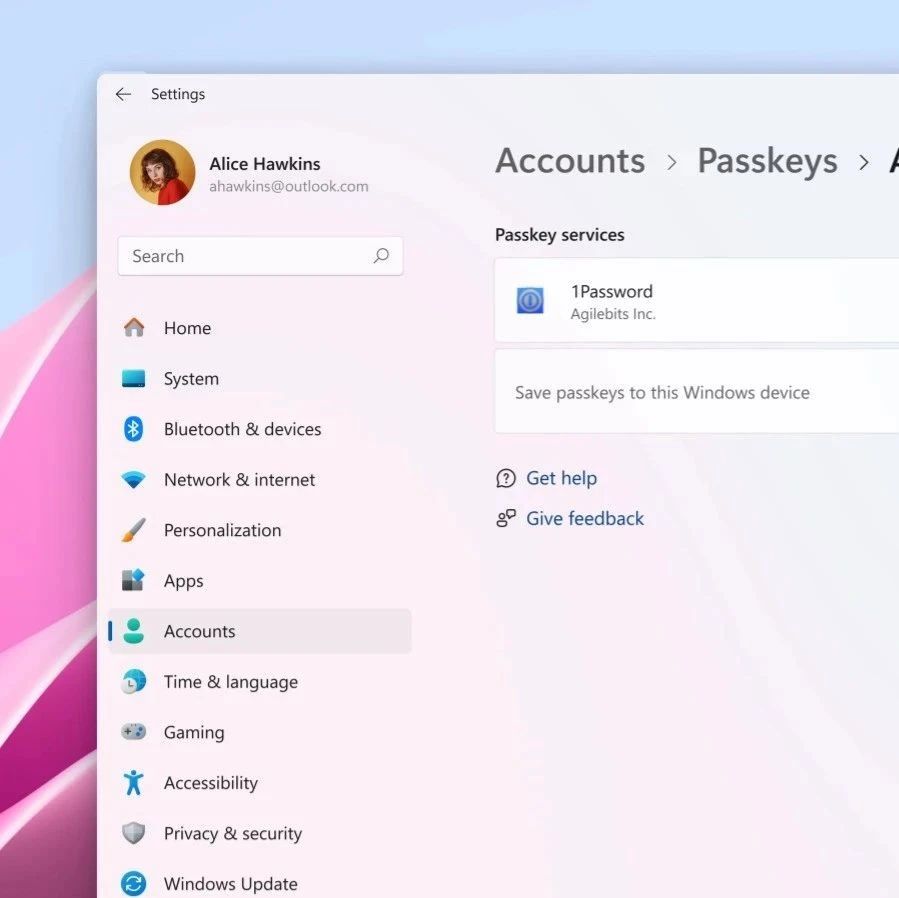
Core Viewpoint - Microsoft has released the first test version of Windows 11 25H2, featuring deep integration with password manager 1Password, allowing users to store and manage passkeys within the password manager instead of the system [1]. Group 1: New Features - The new version includes deep integration with 1Password, where the Windows Security Center will utilize passkeys stored in 1Password and save new passkeys there by default [1]. - Users interested in this feature need to update to Windows 11 Dev Build 26200.5670 / KB5060831 and install the 1Password Beta version [2]. Group 2: Bug Fixes - Fixed issues causing crashes on the File Explorer homepage and during startup [3]. - Resolved problems with duplicate entries when interacting with folders in the Start menu [4]. - Addressed high crash rates of ctfmon.exe affecting normal content input [5]. - Fixed memory leak issues in the lock screen slideshow that could degrade system performance over time [6]. - Corrected the startup sound reverting to the Windows Vista version [7]. - Improved dialog text scaling for clearer display of pop-up text [8]. - Fixed the issue where File Explorer would not retain view changes, affecting user modifications like desktop icon arrangement [8]. Group 3: Installation Issues - Some users may encounter installation failure with error code 0x80070005, leading to automatic rollback. Microsoft is working on a fix, and users can attempt to resolve it through Windows Update settings [9].