AMD

Search documents
Getting Started with AMD Embedded Development Framework (EDF) using Pre-built Images
AMD· 2025-11-11 20:17
Overview of AMD Embedded Development Framework (EDF) - AMD EDF is a methodology for developing and distributing embedded software components for AMD adaptive SoC and FPGA products [2] - EDF is based on open-source tools, including a Yocto Project-based build environment, offering a full software stack from Linux and boot firmware to RTOS and hypervisor support [3] - AMD provides pre-configured system images for evaluation, supporting advanced and multistage boot flows [4] - EDF aims to shorten the development cycle from evaluation to deployment with prebuilt images and automated flows [5] Key Features and Capabilities - Supports platform-level development and embedded software solutions [2] - Offers decoupled software and hardware environments for product development and maintenance [4] - Supports single and multistage boot options, accommodating various boot devices and configurations [9] - Multistage boot initializes hardware in two steps: primary boot via OSPI and secondary boot via SD card [10][11] Getting Started and Evaluation - Requires an AMD Versal evaluation kit and the corresponding AMD EDF Linux BSP Disk Image [6] - The demo uses the Versal AI Edge Series Gen 2 VEK385 evaluation board, supporting multistage boot via OSPI and SD card [7] - The BEAM (Board Evaluation and Management) tool, a web-based GUI, allows monitoring and modifying board parameters [18] Practical Implementation - The process involves connecting to the system controller, programming the OSPI flash with a bootloader, and booting EDF Linux from an SD card [2] - Includes loading a prebuilt PL firmware application and testing it on the development board using a Python script [2][8] - The default boot architecture for VEK385 boards is multistage boot [9]


Hardware Handoff Using Software Hardware Exchange Loop (SHEL) Flow
AMD· 2025-11-11 20:17
Overview of AMD Embedded Development Framework - AMD Embedded Development Framework (EDF) explores the Software Hardware Exchange Loop (SHEL) flow [1] - The tutorial demonstrates generating an XSA from AMD Vivado design suite, building a system device tree, and creating a custom Linux image using the Yocto Project [1] SHEL and Hardware-Software Integration - SHEL streamlines hardware–software integration across AMD Vivado, Vitis tools, and open-source tools [1] - SHEL enables efficient handoff and deployment on AMD Versal™ VEK385 platforms [1] Resources and Contact - More information is available at https://www.amd.com/en/products/software/adaptive-socs-and-fpgas/embedded-software/embedded-development-framework.html [1] - Subscribe to AMD at https://bit.ly/Subscribe_to_AMD [1] - Join the AMD Red Team Discord Server: https://discord.gg/amd-gaming [1]

Developing & Deploying Software with the AMD Embedded Development Framework (EDF)
AMD· 2025-11-11 20:16
Development & Deployment - AMD Embedded Development Framework (EDF) supports SDK-based development flow for AMD Versal adaptive SoCs [1] - EDF SDK can be installed from a shell script and potentially speeds up build tasks compared to on-target building [1] - The SDK allows cross-compilation of applications for Arm cores using an x86 host PC [4] - On-target development allows packages to be installed from the package feed, offering flexibility compared to the fixed content of the SDK [1] Workflow & Tools - The process involves installing the AMD EDF SDK, developing and compiling applications/kernels on an x86 host PC, and deploying them to a Versal AI Edge Series Gen 2 (VEK385) evaluation board [1] - QEMU flow is explored for application deployment, offering system emulation capabilities [1][2] - The "scp" command is used to copy executable files from the SDK to the evaluation board via the PS Ethernet [1] Kernel Module Development - Kernel modules can be developed and compiled on a host PC and deployed to a Versal evaluation board [1][4] - Preparing the kernel involves setting the kernel source directory environment variable and the local version variable [1] - The generated kernel module file can be copied into the kernel module directory of the active kernel on the evaluation board [2]
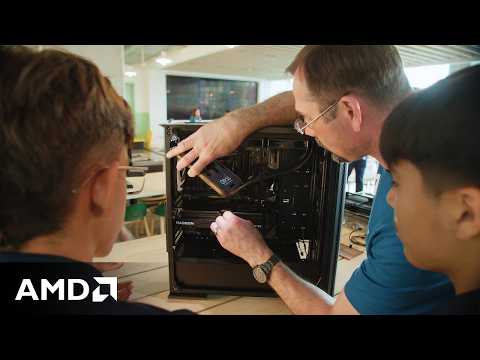
National STEM Day: AMD Inspires Students Through Interactive Computer Builds
AMD· 2025-11-07 00:01
Future Workforce Development - AMD emphasizes the importance of nurturing the next generation of engineers for its future [1] - AMD actively supports students in the STEM field, particularly those interested in computers and PC technology [1] - AMD provides hands-on experience to students, opening doors to future opportunities they may not have considered [2] - AMD's community engagement includes giving back through various events and programs worldwide [1] Technological Advancement & Education - AMD highlights the importance of understanding PC components in the age of AI [3] - AMD aims to inspire students through hands-on experience with processors, graphics cards, and other PC components [3] - AMD's initiatives provide students with a tangible understanding of their potential future roles in the technology sector [2]
Getting Started with AMD Embedded Development Framework (EDF) using Pre-built Images
AMD· 2025-11-03 17:01
Overview of AMD Embedded Development Framework (EDF) - AMD Embedded Development Framework (EDF) provides a fast path to develop and distribute embedded software components for AMD adaptive SoC and FPGA products [2] - EDF is based on non-proprietary and open-source tools, including a Yocto Project-based build environment, offering a full software stack from Linux and boot firmware to RTOS, hypervisor, bare-metal support, and reference designs [3] - AMD provides pre-configured, feature-rich system images for turnkey evaluation, supporting advanced flows as well as single and multistage boot flows [4] - EDF shortens the journey from evaluation to deployment with prebuilt images, automated flows, and role-based development paths [5] Hardware and Software Setup - The demonstration uses the Versal AI Edge Series Gen 2 VEK385 evaluation board, supporting multistage boot via OSPI and an SD card [7] - The default boot architecture for AMD Versal AI Edge and Prime Series Gen 2 boards (VEK385) is multistage boot [9] - The first stage of multistage boot loads the boot firmware and PLM via OSPI, while the second stage loads the Linux operating system using the SD card [10][11] - The board provides 3 COM ports: one for the processor system (PS), one for the programmable logic (PL), and one for the system controller [15] Demonstration and Testing - The Board Evaluation and Management (BEAM) tool, a web-based GUI, allows monitoring and modifying board parameters and running board tests [18] - The demonstration includes flashing the OSPI boot image and the SD card with the EDF Linux BSP Disk Image [20][21] - The prebuilt image contains an example PL firmware application accessed via the dfx-mgr-client command [23] - A Python script is used to interact with the PL, verifying that the PS and PL were both loaded successfully by reading and writing to block RAM addresses and blinking GPIO LEDs [26]

AMD EDF Linux Operating System Integration and Development
AMD· 2025-11-03 17:01
Overview of AMD EDF Linux Integration and Development - The video demonstrates how to use a prebuilt Yocto Project framework to generate EDF Linux disk images and artifacts for AMD embedded devices [1] - It covers creating custom OS images, ranging from simple Linux builds to complex setups with hypervisors and containers [1] - The process includes setting up the Yocto Project environment, building single-stage and multi-stage EDF Linux disk images, and configuring a QEMU environment for emulation [2][3][4] Key Steps and Procedures - Configuring Git with username and email, and setting up the Yocto Project environment are essential initial steps [6][7] - The Repo tool is used to manage multiple Git repositories for EDF flows [5] - Generating a single-stage boot image for VEK280 involves running specific bitbake commands [11] - Generating a multi-stage boot image for VEK385 requires creating an OSPI binary image and a Common EDF Linux disk image [3][16][17] - QEMU can be used to simulate the generated OSPI and WIC images by merging the two images using the bundled qemuboot-tool [4][20][21] Customization and SDK - Customizing the SDK involves modifying the SDK recipe and building it using bitbake [25] - The resulting SDK install script is placed in the "tmp/deploy/sdk" directory [25] File Sizes and Verification - The bootbin file for VEK280 should be approximately 3 to 4 MB [13] - The edf-linux-disk-image .wic file should be approximately 9 to 10 GB [14] - The edf-versal-2ve-2vm-vek385-sdt-seg-.bin file for VEK385 should be approximately 270 MB [19]
Hardware Handoff Using Software Hardware Exchange Loop (SHEL) Flow
AMD· 2025-11-03 17:01
SHEL Flow Overview - AMD's Software Hardware Exchange Loop (SHEL) flow facilitates hardware and software configuration data exchange among open-source and proprietary tools [2][3] - SHEL decouples hardware and software, ensuring synchronization across components like hardware, firmware, software, and operating systems [4] - SHEL translates AMD proprietary XSA into open-source hardware descriptions, allowing integration into existing processes [5] - SHEL enables industry standards like Yocto Project, Xen, OpenAMP, and Zephyr [6] Technical Implementation - The process starts with an XSA file from an AMD Vivado project, extracting the system device tree using SDTGen [6] - SDTGen translates proprietary output from AMD Vivado Design Suite into a stable, open-source format [7] - Gen-machine-conf processes device tree data into Linux build and configuration information within a Yocto Project environment [8] - A custom Linux OS is created based on the system device tree, using a prebuilt template BSP YAML file for VEK385 [21] - Bitbake recipes are run inside the Yocto Project to generate final products, including a boot bin and EDF Linux SD card image [28] Customization and Integration - Users can integrate AMD tools into their existing processes by using open-source hardware descriptions [5] - Customizations can be made to the OS by modifying the local conf file [25] - The gen-machine-conf command with a template parameter of the edited YAML file generates custom Linux build and configuration information [24]
Yocto Project™ Basics
AMD· 2025-11-03 17:01
Overview of Yocto Project - Yocto Project is an open-source initiative providing templates, tools, and methods for building custom Linux-based systems for embedded products [1] - It supports major hardware architectures like x86, Arm, and RISC-V, offering flexibility for various embedded platforms [7] - The project is not an embedded Linux distribution but helps create one tailored to specific requirements [2] Key Components and Features - The core is the OpenEmbedded build system, including OpenEmbedded-Core and BitBake, the build engine [3] - Poky serves as a reference embedded Linux configuration for testing [3] - It features an extensive testing infrastructure and integrated tools for security analysis, license compliance, and SBoM support [4] - Yocto Project enables developers to create tailored Linux distributions customized to meet specific system requirements [6] Industry Adoption and Support - Yocto Project is widely adopted in medical, automotive, and industrial sectors, providing reliable solutions for embedded systems [7] - Major tech companies actively contribute to its development, ensuring continuous innovation and long-term improvements [7] - AMD is a Platinum Partner, contributing to the development and maintenance of tools for creating custom Linux distributions for embedded and IoT devices [9] Customization and Flexibility - The build system includes recipes and layers that can be modified to create a custom embedded Linux system [5] - Yocto Project offers full control over the build, providing flexibility, scalability, and long-term maintainability [14] - It allows developers to build highly optimized Linux distributions tailored to specific hardware and requirements [14] Build Process and Workflow - BitBake automates the process of creating a working Linux OS by configuring local user information, software, layers, and distribution [17][18][19] - The workflow involves configuring key areas, applying patches, and performing sanity checks to generate a bootable Linux system [18][19][20] - The build process also creates an application developer SDK, including a cross-architecture compiler and analytical tools [21]

Developing & Deploying Software with the AMD Embedded Development Framework (EDF)
AMD· 2025-11-03 17:00
Software Development on AMD Versal SoCs - AMD Embedded Development Framework (EDF) SDK facilitates software application development and deployment targeting AMD Versal adaptive SoCs [1] - The SDK supports cross-development on an x86 host, enabling application and kernel development without direct board access [1] - The SDK can accelerate build tasks compared to on-target building, but its content is fixed, requiring recreation from EDF for updates [1] - On-target development allows package installation from the package feed, offering flexibility [1] - The process involves installing the SDK, cross-compiling applications for Arm architecture, and deploying them to the Versal AI Edge Series Gen 2 (VEK385) evaluation board [4] Kernel Module Development - Kernel modules can be developed and compiled on a host PC and deployed to a Versal evaluation board [1] - Preparing the kernel involves setting the kernel source directory environment variable and creating a unique identifier for the kernel in use [1] - The generated kernel module file can be copied into the kernel module directory of the active kernel on the evaluation board [2] Emulation with QEMU - The SDK provides QEMU scripts for full system emulation of the VEK385 board [2] - Booting QEMU requires the same boot artifacts and disk image used to boot on hardware [2] - Applications can be deployed to the emulated Versal system using QEMU, mirroring on-hardware execution [4]

Make the Easy Switch to AMD
AMD· 2025-10-31 12:05
AMD FPGA Design & Migration - AMD aims to unlock the full potential of AMD FPGAs and adaptive SoCs, focusing on easing the migration journey for users [1] - The company provides the Vivado Design Suite, supporting project and non-project modes, TCL scripting, and IP integration [1] - AMD offers guidance on I/O planning, clocking strategies, and PCB design best practices tailored for AMD architectures [1] - AMD facilitates processor system migration, covering processing system to programmable logic connections, boot modes, and platform management [1] Tools & Optimization - AMD provides integrated tools for simulation, verification, and debugging, including logic analyzer and virtual I/O [2] - AMD enables performance optimization with advanced DSP, transceiver, and memory interface design flows [2] - AMD offers a new design conversion methodology guide (UG1192) to ensure a seamless transition, accessible at docs.amd.com [2]