社保缴费

Search documents
波黑塞族共和国2025年公共收入总计445.9亿马克,同比增长10%
Shang Wu Bu Wang Zhan· 2026-01-24 13:58
Core Viewpoint - The public revenue of the Republika Srpska in Bosnia is projected to reach 44.59 billion marks in 2025, reflecting a 10% year-on-year growth, indicating a stable increase in public revenue in recent years [1] Revenue Breakdown - Social security contributions are the largest source of public revenue, totaling 28.49 billion marks, which is a 12% increase year-on-year, with a growth of 3.052 billion marks compared to 2024 [1] - Direct tax revenue is expected to total 9.751 billion marks, showing a 6% increase from 2024, with personal income tax rising by 16% to 4.804 billion marks, while corporate income tax decreased by 5% to 4.329 billion marks [1] - Other public revenues are projected to reach 634.7 million marks, with various categories such as fees, gambling licenses, and fines showing growth rates of 13%, 11%, and 14% respectively [1]
【12366问答】1月大征期新电子税务局可视答疑精选(涉税信息查询、申报常见操作)
蓝色柳林财税室· 2026-01-21 08:02
Group 1 - The article provides a summary of frequently asked questions related to the electronic tax bureau, covering query operations, system anomalies, and declaration processes [1][2][4]. - It outlines the steps for querying corporate credit ratings through the electronic tax bureau, including both quick and detailed methods [1][2]. - The article details the approval process for various tax refunds, including stamp duty and social security refunds, and provides specific navigation paths within the electronic tax bureau [2][3]. Group 2 - Instructions are given for resolving system anomalies, particularly when tax officers encounter operational issues due to insufficient permissions, with a step-by-step guide for authorization [5]. - The article explains how tax professionals can collect and submit information, including the necessary steps for adding personnel to the tax service personnel directory [7]. - It describes the process for querying, printing, or exporting detailed reports for various tax types, including value-added tax and corporate income tax, along with steps for correcting previously submitted reports [9][10]. Group 3 - The article provides guidance on how to delete or modify vehicle information for vehicle and vessel tax, detailing the necessary steps within the tax declaration system [11]. - It explains the procedure for applying for tax refunds due to overpayment or duplicate declarations, emphasizing the use of the "one-stop tax refund" module [12].


用人单位为离职职工办理停保后次月仍有缴费数据,该如何处理?操作步骤
蓝色柳林财税室· 2025-12-23 09:57
Group 1 - The article provides a comprehensive guide on social security payment policies, focusing on the declaration and payment process for social insurance fees [1] - It outlines the steps to verify the cessation of insurance for employees who have left the company, including logging into the electronic tax bureau and checking employee insurance status [3][4] - The article emphasizes the importance of timely updates to the social security status of employees who have left, detailing procedures for different scenarios regarding the timing of departure and cessation of insurance [6][7][8] Group 2 - If an employee's insurance has not been terminated, the company must reapply for cessation of insurance at the social security agency [6] - The article specifies that if the departure and cessation times are both in the current month, the company must pay the social security fees for that month [6] - It also explains the process for handling cases where the departure time is in the previous month, including the need to apply for a modification of the cessation time [7]

跨年后无法补缴!2025年度养老保险缴费将于本月底截止
Xin Lang Cai Jing· 2025-12-21 15:33
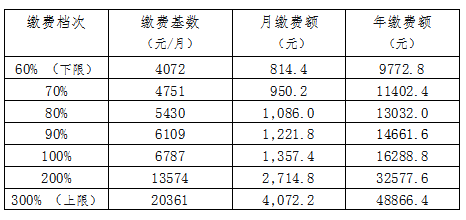
Core Viewpoint - The deadline for pension insurance contributions for flexible employment personnel in Changsha is December 31, 2025, after which no retroactive payments can be made, emphasizing the importance of timely contributions to maintain social security rights [1][3]. Group 1: Contribution Process - The Hunan Province has introduced a fully online process for flexible employment personnel to register and pay for pension insurance, eliminating the need for in-person visits [1]. - Individuals can register and complete their pension insurance application through the "Smart Human Resources" app or WeChat official account, allowing for real-time processing of applications [1]. Group 2: Contribution Base and Amounts - The contribution base for pension insurance in Hunan Province for 2025 is set at 6,787 yuan per month, with flexible employment personnel having a minimum contribution base of 4,072 yuan (60% of the base) and a maximum of 20,361 yuan (300% of the base) [2]. - Monthly and annual contribution amounts vary based on the chosen contribution level, with the lowest monthly payment being 814.4 yuan and the highest being 4,072.2 yuan [2]. Group 3: Importance of Timely Contributions - Timely completion of pension contributions is crucial as failure to do so may interrupt the contribution period, affecting future pension calculations [3]. - Flexible employment personnel are encouraged to utilize online channels for contributions and can contact the 12333 human resources service hotline for assistance [3].
灵活就业人员养老保险费差额补缴:电子税务局App操作指引
蓝色柳林财税室· 2025-10-28 01:14
Core Points - The article provides a detailed guide on how to apply for a tax clearance certificate, including the necessary steps and documentation required for both individual and corporate taxpayers [15][18][25] Group 1: Tax Clearance Application Process - Taxpayers can apply for a tax clearance certificate through the electronic tax bureau by navigating to the "Tax Payment" section and selecting "Certificate Issuance" [18][21] - If there are no pending issues, the system will allow direct access to the tax clearance certificate preview, where users can download the PDF format [18][19] - In cases where there are pending matters, taxpayers will be shown a list of outstanding issues that need to be resolved before obtaining the certificate [20][25] Group 2: Required Documentation - For individual taxpayers, valid identification is required, while corporate taxpayers must provide business licenses and tax registration documents [15][19] - Additional documentation may include the latest company articles of association and profit distribution resolutions for corporate entities [12][13] Group 3: Payment and Submission - Taxpayers must ensure that all relevant tax payments are made before applying for the clearance certificate, as any outstanding payments will prevent the issuance of the certificate [20][25] - The article emphasizes the importance of confirming the accuracy of the payment amounts and personal information before submission [6][8]

涉税名词一起学 | 研发费用加计扣除系列(5)外聘研发人员的劳务费用可以申报研发费用加计扣除吗?
蓝色柳林财税室· 2025-08-05 14:26
Core Viewpoint - The article discusses the eligibility of labor costs for external R&D personnel to be claimed as an additional deduction for R&D expenses, emphasizing that these costs fall under personnel labor expenses. Group 1: R&D Expense Deductions - Labor costs for external R&D personnel can be included in the personnel labor expenses for R&D expense deductions [1] - Personnel labor expenses specifically include salaries, unemployment insurance, basic pension insurance, work injury insurance, basic medical insurance, maternity insurance, and housing provident fund [1]

你问我答 | 电子税务局如何缴纳城乡居民基本养老保险?操作步骤
蓝色柳林财税室· 2025-07-01 00:44
Core Viewpoint - The article provides a step-by-step guide on how to use the electronic tax bureau for social security payment processes, emphasizing the ease of access and user-friendly interface for both individual and third-party payments [2][6][8]. Group 1: User Registration and Navigation - Users must log in to the electronic tax bureau as individuals, with new users required to register first [2]. - The navigation path includes selecting "Local Features," then proceeding to "Social Security Business," followed by "Urban and Rural Residents' Social Security Fees," and finally "Resident Pension" [3][4]. Group 2: Payment Process - For personal payments, users can directly select the payment level and method before clicking "Payment" [6]. - For payments on behalf of others, users need to add personnel by entering their name and identification number, then select the appropriate payment level and method [7]. Group 3: Payment Completion and Verification - If there is a need to make a supplementary payment for pension insurance, users must register the supplementary payment information with the human resources department before proceeding with the payment [8]. - After completing the payment, users can check the payment results under "Social Security Business" by selecting "Payment Certificate Issuance" or "Payment Record Inquiry" [8]. Group 4: Additional Information - A reminder is provided that payment certificates can only be printed two working days after successful payment, excluding holidays [9].