语音输入功能

Search documents
微信又有新功能!网友:太方便了!
新华网财经· 2026-03-21 09:49
Group 1 - The latest version of WeChat for PC (4.1.8) introduces several practical features aimed at enhancing office and chat efficiency, including voice input, one-click message recall, and video playback speed adjustment [1][2][5] - The voice input feature allows Windows users to activate it by pressing "Ctrl+Win" or clicking the microphone icon in the chat box, while Mac users can use the "fn" key [2] - Users can now recall all messages at once, making it easier to manage mistakes in chat without having to handle each message individually [5] - The video playback feature enables users to switch playback speed easily, allowing for quicker access to key information without dragging the progress bar [5] Group 2 - Multiple gold brands have announced price adjustments [9] - Sushi restaurant chain responded to consumer reports of finding parasitic eggs in tuna [11]



微信又出新功能!网友:越快越好
券商中国· 2026-03-20 01:12
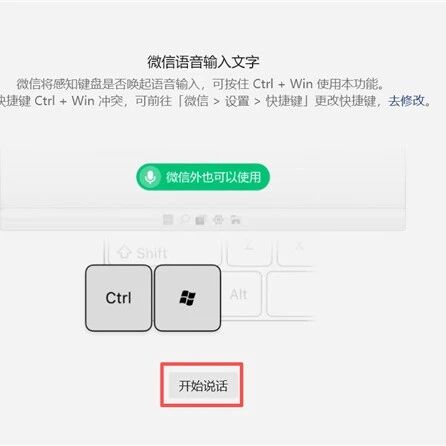
3月19日,据微信派消息,电脑版微信迎来多项实用新功能更新,用户升级至最新版电脑端微信(4.1.8)后,即可体验语 音输入、一键撤回以及视频倍速播放功能,进一步提升办公与聊天效率。 1、讲两句,比打字更快 如果不想一直按住键盘,还可使用快捷键"Ctrl+Win+Shift"(Mac为"Ctrl+fn")。 值得一提的是,该语音输入功能不局限于微信聊天框,在文档、表格等其他应用场景中同样适用。 2、一次性撤回,更快 一时失误,都能理解。但一串失误,应对起来有点麻烦。 键盘敲冒烟,不如讲两句。 电脑端微信支持语音输入了。Windows用户只需按住"Ctrl + Win"键或点击聊天框里的小话筒,即可使用"语音转文字"功 能。 Mac用户可按住"fn"键启用。 电脑端能一键撤回所有消息了。当用户在聊天中发送了不合适或错误的信息,可对多选转发、批量发送的图片、视频及文 件进行统一撤回,操作更加高效,避免逐条处理的繁琐。 据悉,该功能目前仅在iOS版本小范围开放。用户选择三张及以上图片或视频后,发送界面会出现合并发送选项,开启后图 片将以折叠卡片形式呈现。 同时,有网友反馈称,该功能的接收方还可以左右滑动预览——点击" ...
解放双手!微信PC版上线新功能,支持全局调用
猿大侠· 2026-02-15 04:11
Core Viewpoint - The recent launch of the voice input feature on WeChat for PC addresses long-standing user complaints about the lack of native voice input functionality, significantly improving efficiency in various tasks such as office work and meeting notes [1][2]. Group 1: Voice Input Functionality - The new voice input feature allows users to convert speech to text in real-time, supporting Mandarin, dialects, and mixed Chinese-English recognition [2]. - Users can activate voice input easily through specific keyboard shortcuts, enhancing usability across different applications without needing to switch windows [3]. Group 2: Text Organization Feature - The "organize text" function automatically removes filler words and adjusts sentence structure, making it particularly useful for generating formal written documents like meeting minutes [2]. Group 3: Additional Features - The 4.1.7 version also introduced a group response feature, allowing users to initiate polls and surveys easily within group chats, further enhancing WeChat's functionality as a productivity tool [5].

App适老化评测报告发布,广告干扰与“浅改造”问题仍明显
Xin Jing Bao· 2025-06-01 02:17
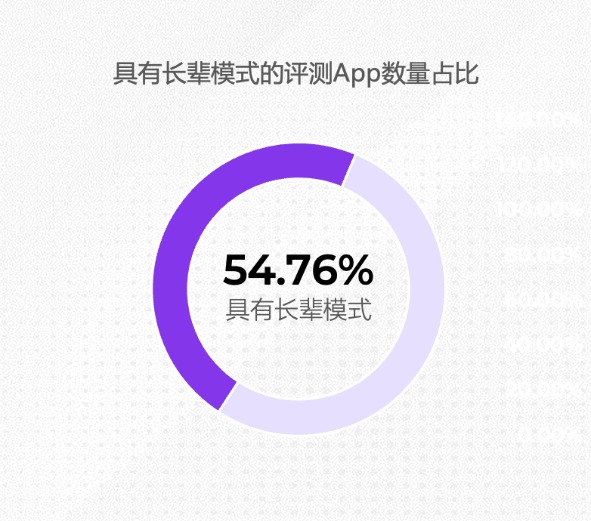
Core Insights - The report titled "2025 Mobile Internet Application Aging Adaptation Status and Innovation Trends" analyzes the current state and innovation trends of app adaptation for the elderly, revealing both advancements and areas needing improvement in app usability for older users [1][21]. Group 1: Current State of App Adaptation - Over half of the evaluated apps (54.76%) have implemented elder modes, with 46 out of 84 apps assessed [2]. - The adaptation features include large font displays, high-contrast color schemes, and simplified layouts, which have become basic standards for elder-friendly apps [4]. - Voice recognition and voice broadcasting functions are increasingly important, with 63.04% of apps with elder modes offering voice input capabilities [4][19]. Group 2: Industry-Specific Adaptation Levels - Financial service apps have the highest adaptation rate at 100%, driven by a focus on user safety and regulatory requirements [6]. - E-commerce apps follow with a 70% adaptation rate, while health and reading apps lag significantly at 20% and 10%, respectively [8]. - The disparity in adaptation levels across industries indicates a lack of unified standards and effective regulation [8]. Group 3: User Experience Challenges - Advertising interference remains a significant issue, particularly in shopping apps, where high information density can overwhelm elderly users [9][11]. - The accessibility of switching to elder modes is often hindered by non-standardized entry points, making it difficult for users to find and activate these features [13]. - Some apps revert to standard modes after exiting, requiring repeated actions to switch back, which disrupts user experience [15]. Group 4: Design and Functionality Issues - There is a tendency for apps to overly simplify features, which can lead to the removal of essential functionalities that elderly users need [16]. - The balance between simplification and functionality is crucial, as excessive simplification can hinder usability [17]. - Industry-specific characteristics can create conflicts with elder user needs, particularly in fast-paced apps like social media [18]. Group 5: Trends in Technology and Emotional Design - The development of elder-friendly apps is supported by advancements in digital technologies, particularly voice recognition [19]. - One-click automation features are emerging as a key trend, simplifying complex processes for elderly users [19]. - Emotional design elements, such as warm color schemes and encouraging language, are being integrated to enhance user trust and comfort [20].