VS Code

Search documents
X @Sam Altman
Sam Altman· 2026-02-09 19:20
GPT-5.3-Codex is rolling out today in Cursor, Github, and VS Code! ...
“百度完了”!搜 Kimi 全是推广,月之暗面暗示收敛。网友调侃:祖传技能,谁叫你不充值
程序员的那些事· 2026-02-01 04:15
Core Viewpoint - The article discusses user dissatisfaction with Baidu's search results, highlighting concerns over paid promotions overshadowing genuine content, particularly for the Kimi website [1][3]. Group 1: User Experience and Search Results - A user expressed frustration on social media, claiming that Baidu's search results for Kimi were dominated by promotional links, pushing the official website down the rankings [1]. - Kimi's official account responded by sharing a screenshot showing that the top four search results were indeed paid promotions, subtly criticizing Baidu's practices [3]. - Following the backlash, Baidu adjusted its search algorithm, placing Kimi at the top and removing the paid promotions, indicating a reactive approach to user feedback [5]. Group 2: Broader Implications - The issue is not limited to Kimi; it extends to other well-known brands and even free/open-source tools like VS Code and Python, where users encounter misleading paid promotions [5]. - An example was provided where a user searching for "Python free download" was misled by a paid link offering a download for 0.01 yuan, which included a default subscription for 99 yuan per month, showcasing the potential for consumer exploitation [5].



专家解读“Claude Code”
2026-01-28 03:01
Summary of Conference Call on Cloud Code Company and Industry - The discussion revolves around **Cloud Code**, a product in the **AI and Internet Media** sector, particularly focusing on programming and automation capabilities. Core Points and Arguments 1. **Introduction to Cloud Code**: - Cloud Code is described as a client-side product that operates through command line interfaces, enabling programming and execution of tasks efficiently [1][2][3]. 2. **Advancements in AI Programming**: - The latest models, such as those from OPPO and Sonos, have significantly improved code writing capabilities, reducing the need for human intervention in programming tasks [2][3]. 3. **Efficiency in Code Review**: - With Cloud Code, the understanding of the programming environment is comprehensive, allowing users to spend minimal time reviewing code rather than writing it from scratch [3][4]. 4. **Functionality of Cloud Code**: - Cloud Code can interact with files, create or modify them, and control external applications like browsers and databases through commands [4][5]. 5. **Comparison with Traditional IDEs**: - Unlike traditional IDEs like VS Code, which require user interaction for running programs, Cloud Code automates the entire process, executing commands without needing user approval at each step [11][19][21]. 6. **Error Handling and Debugging**: - Cloud Code can analyze code for bugs and provide detailed feedback on errors, which previously required manual searching on platforms like Stack Overflow [14][17][27]. 7. **Automation and Task Management**: - The product operates on a to-do list system, executing tasks automatically until all items are completed, which enhances productivity [29][30]. 8. **Natural Language Processing**: - Users can issue commands in natural language, making it accessible for non-programmers to utilize its capabilities effectively [42][49]. 9. **Model Performance**: - The success of Cloud Code is attributed to its robust underlying model, which excels in understanding user requirements and executing tasks accurately [27][45]. 10. **Future Developments**: - There is potential for further advancements in Cloud Code, especially as more companies enter the market with similar products, indicating a competitive landscape [56]. Other Important but Possibly Overlooked Content 1. **Technical Requirements**: - Users may need to configure proxies for domestic use to connect to Cloud services effectively [10]. 2. **Token Consumption**: - The system tracks token usage for operations, with limits based on user account types, which could impact usage for extensive tasks [51][54]. 3. **User Experience**: - The interface may not be user-friendly for all, particularly for those unfamiliar with command-line operations, which could deter some potential users [43]. 4. **Resource Utilization**: - The product primarily utilizes CPU resources for running tasks, with minimal reliance on GPU unless specifically programmed to do so [34][35]. 5. **Integration with Other Platforms**: - Cloud Code can be integrated with messaging platforms like Discord for command execution, showcasing its versatility [48]. This summary encapsulates the key discussions and insights from the conference call regarding Cloud Code, highlighting its innovative features and potential impact on programming and automation in the AI sector.
VS Code现在能像Figma一样搞设计了
量子位· 2026-01-23 10:25
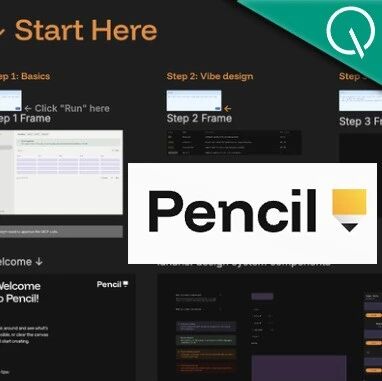
Core Viewpoint - The article discusses the emergence of a new tool called Pencil, which integrates design and coding by allowing users to convert Figma designs directly into code using AI, thereby redefining UI design processes [2][4][25]. Group 1: Introduction of Pencil - Pencil is described as an agent-driven MCP canvas tool that allows for real-time updates of code logic as design elements are manipulated [6][10]. - The tool enables users to drag and drop elements on a design canvas, with the underlying code being updated instantly [9][10]. Group 2: Functionality and Applications - Users can either download Pencil and connect it to Claude Code for Vibe design or install a Pencil plugin in IDEs like VS Code, integrating design and coding environments [11]. - The process involves inputting ideas into an AI prompt window to generate a temporary design, which can then be adjusted and converted into code for browser preview [13][14]. Group 3: Design and Code Integration - Pencil operates on the principle of "design as code," directly modifying UI definitions in the codebase rather than generating visual files [30][31]. - This integration allows for real-time changes in the codebase as design elements are adjusted, ensuring pixel-perfect alignment [32]. Group 4: Compatibility and Version Control - Pencil is compatible with Figma, allowing users to copy and paste designs while retaining vector, text, and style integrity [33][34]. - The design files can be managed like code, enabling version control, branching, and merging within the code repository [35]. Group 5: Impact on UI Design - The introduction of Pencil signifies a shift in UI design, moving from static visual files to dynamic, code-based design processes [24][25]. - This AI-driven collaboration redefines how designers and developers interact, breaking down traditional barriers between design and development [10][25].
慢雾余弦:VS Code 系 IDE 自动执行 tasks 存在安全风险
Xin Lang Cai Jing· 2026-01-18 04:03
Core Viewpoint - The article highlights a potential security risk associated with IDEs based on VS Code, including Cursor, VS Code, Antigravity, and TRAE, which may automatically execute tasks, potentially triggering malicious code when opening directories [1] Group 1: Security Risks - Slow Fog's Yu Xian warns users about the risk of automatic task execution in VS Code-based IDEs [1] - Users are advised to disable the "automatic task running" feature to prevent malicious code execution [1] - Suggested security measures include setting task.allowAutomaticTasks to off and enabling Workspace Trust in Cursor for risk confirmation when opening new projects [1] Group 2: Mitigation Strategies - The article recommends confirming risks even when choosing to trust the workspace to avoid automatic execution of commands hidden in .vscode/tasks.json [1]
VS Code 重磅更新:新增智能体管理功能,但下架免费代码补全工具。网友:微软你倒是说清楚
程序员的那些事· 2025-12-20 07:40
Core Viewpoint - The article discusses the major updates to Microsoft's VS Code, focusing on the introduction of AI-assisted programming features, the controversial discontinuation of IntelliCode, and the preview of TypeScript 7, highlighting both opportunities and risks in the evolving landscape of programming tools [5][10][13]. Group 1: AI-Assisted Programming Features - The core highlight of the update is the introduction of the Agent HQ, which serves as a management center for multiple AI agents, enhancing programming efficiency [5]. - Ten new features related to AI agents have been introduced, including the ability to keep agents active when the chat window is closed and the option to run custom sub-agents [6]. - The update has sparked debate over the Agent HQ concept, as it is described as a long-term direction rather than a specific feature [5]. Group 2: Security Concerns - The introduction of AI agents raises significant security risks, including the threat of prompt injection attacks that could lead to sensitive information leaks [7]. - A controversial feature called YOLO mode has been introduced, which removes manual approval processes for all tools in the workspace, significantly increasing the risk of device compromise [9]. Group 3: TypeScript 7 Preview - TypeScript 7 has been introduced in a preview version, featuring a new compiler and language service written in Go, aimed at achieving high-performance capabilities [10]. - The update promises to reduce loading times and memory usage, enhancing the overall responsiveness of the editor [12]. Group 4: Discontinuation of IntelliCode - The discontinuation of IntelliCode, a free AI code completion tool with over 60 million users, has drawn criticism from developers [13]. - Developers will now need to subscribe to GitHub Copilot for AI-assisted code completion, which offers limited free usage before requiring payment [14]. - This shift reflects Microsoft's broader commercial goals, despite VS Code being an open-source product [15].


没啥用的 VS Code 摸鱼神器,但我能玩一天!写代码放烟花、养宠物超上头~
菜鸟教程· 2025-12-18 03:31
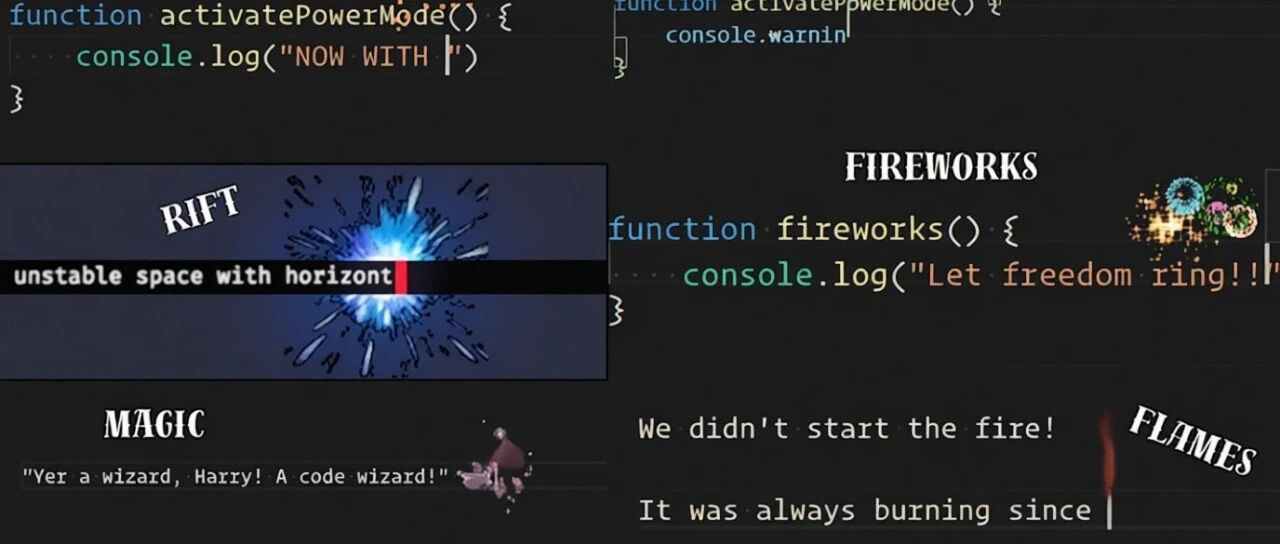
Core Viewpoint - The article introduces various fun and entertaining VS Code extensions that enhance the coding experience, providing a break from the monotony of coding tasks. Group 1: VS Code Extensions - **vscode-pets**: This extension allows users to summon pixelated pets (like cats, dogs, and more) in the editor, which can interact and play games, adding a playful element to coding [1][2][4]. - **Power Mode**: This extension adds visual effects to the editor, such as explosions and sparks, triggered by keystrokes, making coding feel more dynamic and engaging [9][10][12]. - **In Your Face**: A series of extensions that display increasingly distressed expressions based on the number of code errors, providing a humorous take on coding challenges [14][15][17]. - **Chrome Dinosaur Game**: This extension brings the classic offline dinosaur game from Chrome into the editor, allowing users to play while coding, with controls similar to the original game [21][22][25].
JetBrains放弃Fleet:急刹变道打造全新Agentic IDE,与VS Code、Cursor争夺下一代AI编程王座
AI前线· 2025-12-14 05:32
Core Viewpoint - JetBrains has decided to discontinue the development of its IDE Fleet, which has been in public preview since its launch in 2021, and will focus on a new development environment called Air aimed at agentic development [2][6]. Group 1: JetBrains and Fleet - JetBrains has a comprehensive suite of IDE products primarily based on the IntelliJ core platform, which has been in use since 2001 [4]. - Fleet was intended to be a lightweight, collaborative IDE to compete with Microsoft's Visual Studio Code (VS Code), which has gained popularity for its features [4][5]. - Despite some initial interest, most developers remained loyal to the IntelliJ series due to its robust plugin ecosystem and Fleet's prolonged public testing status [5]. Group 2: Discontinuation of Fleet - JetBrains announced that Fleet will no longer be available for download starting December 22, 2025, as maintaining two IDE product lines was causing user confusion and internal resource dilution [6]. - The company acknowledged that it failed to replace IntelliJ IDEA with Fleet or narrow its focus to a clear, differentiated niche [6]. - Although Fleet is being discontinued, its components will be integrated into other JetBrains IDEs, and the new product Air is an evolution of the Fleet platform [6]. Group 3: Introduction of Air - Air is designed to focus on a new workflow that leverages AI capabilities, allowing developers to delegate significant tasks to agents, which contrasts with traditional IDE workflows [7][8]. - The agentic workflow involves structured task definitions and asynchronous execution, which necessitates a different tool experience than traditional IDEs [8]. - Air is currently in public testing and will support multiple operating systems and cloud execution, enhancing its functionality beyond what Fleet offered [8]. Group 4: Developer Reactions and Market Position - Some developers expressed disappointment over the discontinuation of Fleet, believing it had the potential to compete effectively with VS Code and other emerging tools [10]. - The shift from Fleet to Air reflects a recurring pattern in JetBrains' strategy to adapt to evolving software development paradigms, particularly in the AI programming tool space [11]. - There are concerns about the necessity of creating a new tool rather than enhancing existing IDEs with AI features, raising questions about developer migration to Air [11].

Agentic AI基金会成立:智能体的“Linux时刻”来了!
Sou Hu Cai Jing· 2025-12-11 22:52
Core Insights - The Linux Foundation has launched the Agentic AI Foundation (AAIF), marking a shift in the AI field towards collaborative autonomous agents, seen as the "Linux moment" for AI [2] - AAIF aims to serve as a neutral hosting platform for open-source projects related to AI agents, with major tech companies like Amazon, Google, and Microsoft joining as members [2] - The foundation's initial technical pillars include three core open-source projects: MCP protocol, AGENTS.md specification, and Goose framework, contributed by Anthropic, OpenAI, and Block [2][3] Group 1 - MCP (Model Context Protocol) is designed to standardize the connection between AI agents and external data sources, likened to a "USB-C interface" for AI [3] - AGENTS.md provides a Markdown-based standard for defining agent behavior in specific projects, while the Goose framework offers a structured workflow for agent development [3] - The AAIF aims to prevent monopolization of AI agent ecosystems by establishing interoperability standards and best practices [3] Group 2 - MCP has already been implemented in over 10,000 servers, with support from major products like ChatGPT and Microsoft Copilot, indicating strong industry recognition of the open protocol [4] - Despite skepticism about the collaboration being merely a "brand alliance," proponents argue that the protocol facilitates collaboration without redundant integration efforts [4] - The AAIF's funding model includes tiered membership fees, but control over project direction is maintained by a technical steering committee, ensuring that no single member can dictate the development path [5] Group 3 - The importance of shared standards is underscored by a UiPath report indicating that 65% of enterprises will initiate agent pilot programs by mid-2025, yet only 5% have seen financial returns [5] - The AAIF aims to promote compatibility among agent development frameworks, cloud service providers, and developer tools, emphasizing that the scale of AI is determined by solution construction rather than model size [6] - Challenges remain, including concerns about the maintenance of protocols and the practical utility of the Goose framework, but the focus is on creating a sustainable ecosystem rather than perfect standards [6]

Why IDEs Won't Die in the Age of AI Coding: Zed Founder Nathan Sobo
Sequoia Capital· 2025-12-02 10:01
Core Argument - The IDE is not dead; human interaction with source code remains essential, even with AI assistance [1][8][11] - Source code is a language intended for human consumption, requiring visual interfaces for understanding AI agent actions [3][8][9] - The best user interface for code interaction is likely a GUI, optimized for presenting and navigating source code [12][13] Zed's Vision and Strategy - Zed aims to provide the ultimate interface between humans, source code, and AI agents, acting as a "Switzerland" for collaboration [41][40] - Zed is building a vertically integrated environment with fine-grained tracking of code evolution, enabling anchored conversations and interactions [38][39][40] - Zed's architecture prioritizes performance, aiming for zero perceptible lag in keystroke feedback [30][31] - Zed is designed as an inherently collaborative environment for multiple humans and AI agents [81][82] Agent Client Protocol (ACP) - ACP aims to democratize AI agent integration, allowing developers to use various agents with a great UI, similar to the Language Server Protocol [44][46] - ACP facilitates the externalization of agent intelligence, enabling different agents to compete and specialize in particular problems [45][46] AI's Role in Coding - LLMs are good at generating code from well-known knowledge and implementing code from abstract models [71][75] - LLMs are less helpful when the task involves novel problem-solving or when the code is not the primary constraint [72][73][76] - The industry is exploring how to manage multiple conversations with multiple agents and make those conversations more valuable [88] User Base and Adoption of AI - Zed has approximately 170,000 active developers, many of whom are experienced engineers [2][54] - About half of Zed users are using edit prediction, and a quarter are using agentic editing [56] Future IDE Evolution - The IDE will evolve into a collaborative environment where conversations with agents can be shared with human teammates [82] - Codebases will become metadata backbones, with conversations, edits, and context linked directly to the code [83][84] - The IDE interface will evolve to put conversations front and center, potentially modeling conversations as evolving documents [85][89]